Automated Ticket Creation: Why your team should never type an outage twice
“Everything gets typed twice. Once in monitoring, once in our ticket system.”
If that sentence sounds familiar, you are not alone. For most IT teams managing multiple locations, an outage creates two jobs at once: fix the problem, and document the problem. The monitoring tool sees the circuit go down. Then someone opens the helpdesk, starts a new ticket, and retypes what the monitoring tool already knows.
It feels like a minor inefficiency. It is not. That second round of typing is where your outage response quietly starts to break.
The hidden cost of double entry
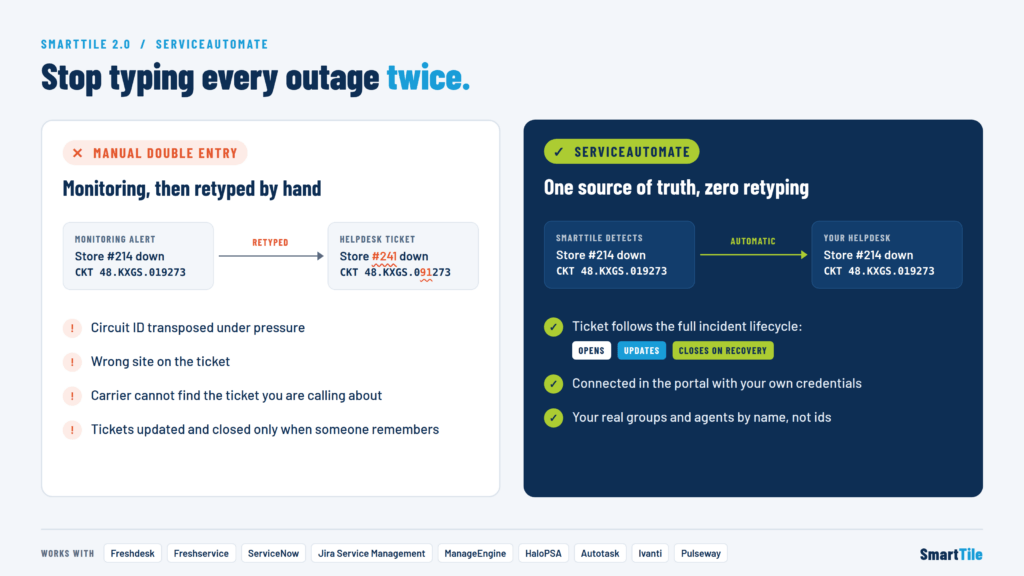
Double entry is where detail goes missing. Under pressure, with a site down and users calling, a technician copies information from one screen into another. And that is exactly when small errors slip in:
- The circuit ID gets transposed. Two digits swap places, and now the ticket references a circuit that does not exist.
- The site is wrong. A store number or branch name gets mixed up with a similar location.
- The carrier cannot find your ticket. When your team calls the carrier to escalate, the reference they give does not match anything on the carrier’s side.
Each of these mistakes adds minutes, sometimes hours, to resolution. Your team ends up troubleshooting the paperwork instead of the outage. Meanwhile, the location stays offline, and the ticket history that should help you spot recurring issues is filled with inconsistent, unreliable data.
Manual ticketing also creates a lag problem. The ticket only gets opened when someone has time to open it, and only gets updated when someone remembers to update it. By the time it closes, the record may not reflect what actually happened.
What automated ticket creation should look like
The fix is not asking your team to type more carefully. The fix is removing the second round of typing entirely.
True automated ticket creation means your monitoring platform talks directly to your service desk. When an incident is detected, a ticket opens with the correct details already filled in. As conditions change, the ticket updates itself. When the service recovers, the ticket closes. No retyping, no transposed digits, no guessing which site went down.
That is exactly what SmartTile 2.0 delivers with ServiceAutomate.
Meet ServiceAutomate in SmartTile 2.0
ServiceAutomate opens the ticket in the system your team already works in. There is no new helpdesk to learn and no workflow to rebuild. SmartTile connects to the platforms IT teams and MSPs rely on every day:
- Freshdesk
- Freshservice
- ServiceNow
- Jira Service Management
- ManageEngine
- HaloPSA
- Autotask
- Ivanti
- Pulseway
Once connected, ServiceAutomate handles the full ticket lifecycle:
- Opens the ticket the moment SmartTile detects an incident, with accurate site and circuit details pulled straight from monitoring.
- Keeps it updated as the situation changes, so everyone looking at the ticket sees the current state.
- Closes it on recovery, so your queue reflects reality instead of a backlog of stale incidents.
Because the data flows directly from monitoring into your ITSM or PSA platform, the circuit ID that reaches your ticket is the same circuit ID SmartTile is watching. When your team calls the carrier, the reference matches.
Set up on your terms
Integrations are often where automation projects stall. Someone has to hunt down API keys, map internal IDs, and guess which fields the other system will accept. ServiceAutomate was built to remove that friction.
You connect it yourself
Your team connects ServiceAutomate directly in the SmartTile portal using your own helpdesk credentials. No waiting on a professional services queue to get started.
Your credentials stay yours
Credentials are encrypted against your company alone. They are not shared across customers or pooled in a common store.
Names, not IDs
SmartTile reads your real groups and agents back out of your helpdesk. That means setup offers you the names your team recognizes, like “Network Operations” or a specific technician, instead of a list of cryptic internal ID numbers you would otherwise have to look up.
Only settings that actually work
ServiceAutomate only offers the settings your system’s API can actually honor. You will not configure a field mapping that looks fine in setup and then silently fails when the first real incident fires.
Who benefits most from helpdesk automation
ServiceAutomate is built for teams where outages happen across many locations and every minute of manual work adds up:
- Multi-location enterprises managing dozens or hundreds of sites, where getting the location right on every ticket matters.
- School districts with lean IT staff who cannot afford to spend incident time on data entry.
- MSPs and IT service providers running PSA platforms like HaloPSA or Autotask, where ticket accuracy drives both service quality and billing.
- Internal IT and NOC teams on ServiceNow, Jira Service Management, or Freshservice who want monitoring and service management working as one system.
Automated Ticket Creation is where faster resolution starts
Every outage response depends on accurate information moving quickly. When your team types the outage into monitoring and then types it again into the ticket system, that second typing is where the circuit ID gets transposed and the carrier cannot find your ticket.
SmartTile 2.0 with ServiceAutomate eliminates that step. The ticket opens itself, stays current, and closes on recovery, all inside the helpdesk your team already uses.
Ready to stop typing every outage twice? Schedule a SmartTile demo and see ServiceAutomate connect to your service desk.