ServiceNow incidents that open, route and resolve themselves
The SmartTile 2.0 ServiceNow network monitoring integration turns every confirmed outage into an incident your assignment rules already know how to route, then resolves it when the site is back.
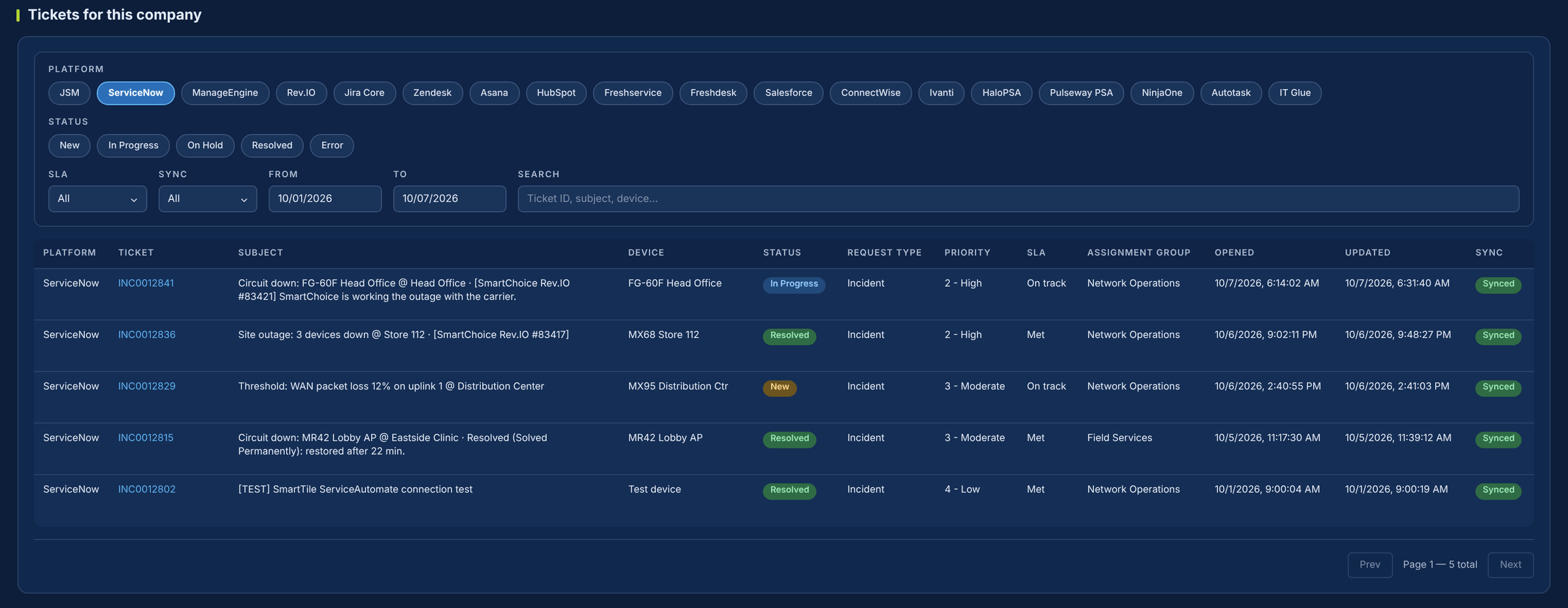
Your service desk lives in ServiceNow. Your network alerts live somewhere else.
Every outage starts with an analyst re-typing an alert email into an incident, hunting for the device and the site. SmartTile 2.0 closes that gap. It connects to your own ServiceNow instance, so a confirmed outage becomes an incident your assignment rules already route, and a recovery resolves it.
What your team gets from the ServiceNow integration
Outages arrive as incidents, not emails
Once a device stays down past its open delay, an incident opens in your instance with the device, the site and the SmartChoice ticket number already filled in.
One incident per site, never a flood
When a whole site drops, the second device joins the open incident instead of opening another. Twelve devices down is still one incident.
Routed by the rules you already trust
Pick an assignment group, caller and category from your own instance, stored by sys_id so a renamed group still routes. Or leave them blank and your rules decide.
Resolved when the site is back
On recovery the incident moves to Resolved with a close note: on restore, after the site has been stable for a set time, or never, by your policy.
Both desks see the same story
Your analysts’ comments and work notes are carried to the SmartChoice ticket every 5 minutes, and SmartChoice’s updates come back as comments.
Linked to your CMDB when you want it
SmartTile 2.0 can match the configuration item by device name, then IP. No match simply leaves the incident unlinked, never failed.
Where the minutes go today, and where they stop
| The moment | Today | With SmartTile 2.0 |
|---|---|---|
| A site goes down | An alert email. Someone logs an incident by hand and hunts for the device and site. | An incident opens by itself after the open delay, with the SmartChoice ticket number in the description. |
| The whole site drops | Twelve devices, twelve incidents. | The second device at the same location joins the open incident. |
| It comes back | Someone notices and resolves it, or it ages in the queue. | Resolved with a close note, on restore or after it stays stable, per your policy. |
| Who’s working it? | Two systems, two stories. | Comments and work notes are carried between ServiceNow and the SmartChoice ticket. |
| Is the link healthy? | You find out when an incident fails to open. | Test Connection and Fire Test Incident prove it on demand. |
Why IT leaders add it to their stack
More from the ServiceNow you already pay for
Nothing to replace. Your instance becomes the place network outages show up, already routed and already resolving.
Built on the standard Table API
SmartTile 2.0 connects through the ServiceNow Table API with OAuth 2.0 or Basic auth, per company, on your own instance.
A service account, not a person’s password
A dedicated integration user with the itil role. Secrets are encrypted at rest and every incident lands in an audit ledger.
No duplicate incidents, no aging tickets
One incident per site, resolved on recovery, so your queue reflects what is actually broken.
Live with one integration account
-
1Create an integration userA dedicated account with the itil role, not a named person.
-
2Connect SmartTile 2.0 to your instanceEnter your instance URL and choose OAuth 2.0 or Basic auth.
-
3Discover your groups and categoriesSmartTile 2.0 reads your real assignment groups, users and categories into pick-lists.
-
4Set impact and urgency, then testSave your defaults and fire a test incident.
Test Connection and Fire Test Incident prove the link before anything goes live. The test incident opens and resolves itself seconds later.
Security and control
Learn exactly how it works
The two-page technical overview covers every Table API call SmartTile 2.0 makes to your instance, the settings that control routing and resolution, and how credentials are protected. Built for the ServiceNow admin who will sign off on it.
ServiceNow integration FAQs
Our assignment rules already route incidents. Will SmartTile 2.0 override them?
No. Leave group and caller blank and your rules decide, or pick them from your own groups, stored by sys_id.
Will network monitoring flood our ServiceNow queue?
No. The open delay is set per device, there is one incident per site, and incidents resolve on restore by your ticket policy. A blip shorter than the delay opens nothing.
Do we have to give a vendor a named person’s password?
No. Use a dedicated integration account with the itil role, or OAuth with a refresh token. Credentials are never shown again in the clear.
Our CMDB is messy. Is that a problem?
No. CI linking is a toggle, and a missing or ambiguous match just leaves the incident unlinked.
How does the ServiceNow network monitoring integration resolve incidents?
On recovery, SmartTile 2.0 sets the incident to Resolved with a close code and a note saying why. If ServiceNow refuses the update, SmartTile 2.0 keeps it open rather than pretend it closed.
Works with the rest of your stack
The incident is already in ServiceNow, routed to the right group
See it work against your own instance in a 30-minute demo.