Palo Alto firewalls, read end to end
The SmartTile Palo Alto firewall monitoring integration gives you HA, tunnels, rule changes, config backups and admin sign-ins from one read-only API admin, with tickets in the ITSM your team already uses.
Ping says the firewall is up. It doesn’t say the HA peer dropped.
It doesn’t say a Threat Prevention license lapses next week, a branch tunnel is down, or someone edited a rule at 2 a.m. The PAN-OS XML API answers all of that. SmartTile reads it, puts your Palo Alto next to the rest of your network, and never changes a thing on the firewall.
What your team gets from the Palo Alto Networks integration
HA and health every 5 minutes
HA state and sync, interfaces and zones, session table use, dataplane CPU, hardware sensors and license expiry, read on a schedule.
Every tunnel and remote user in view
Each IPsec tunnel with its state, peer and monitor, plus the GlobalProtect users connected right now.
A change ledger for every rule
Security and NAT rules for every virtual system, re-read hourly. Each rule added, removed, changed or moved is logged.
Config backups with diffs
The running configuration exported on the device’s backup schedule, kept as a new version only when it changed.
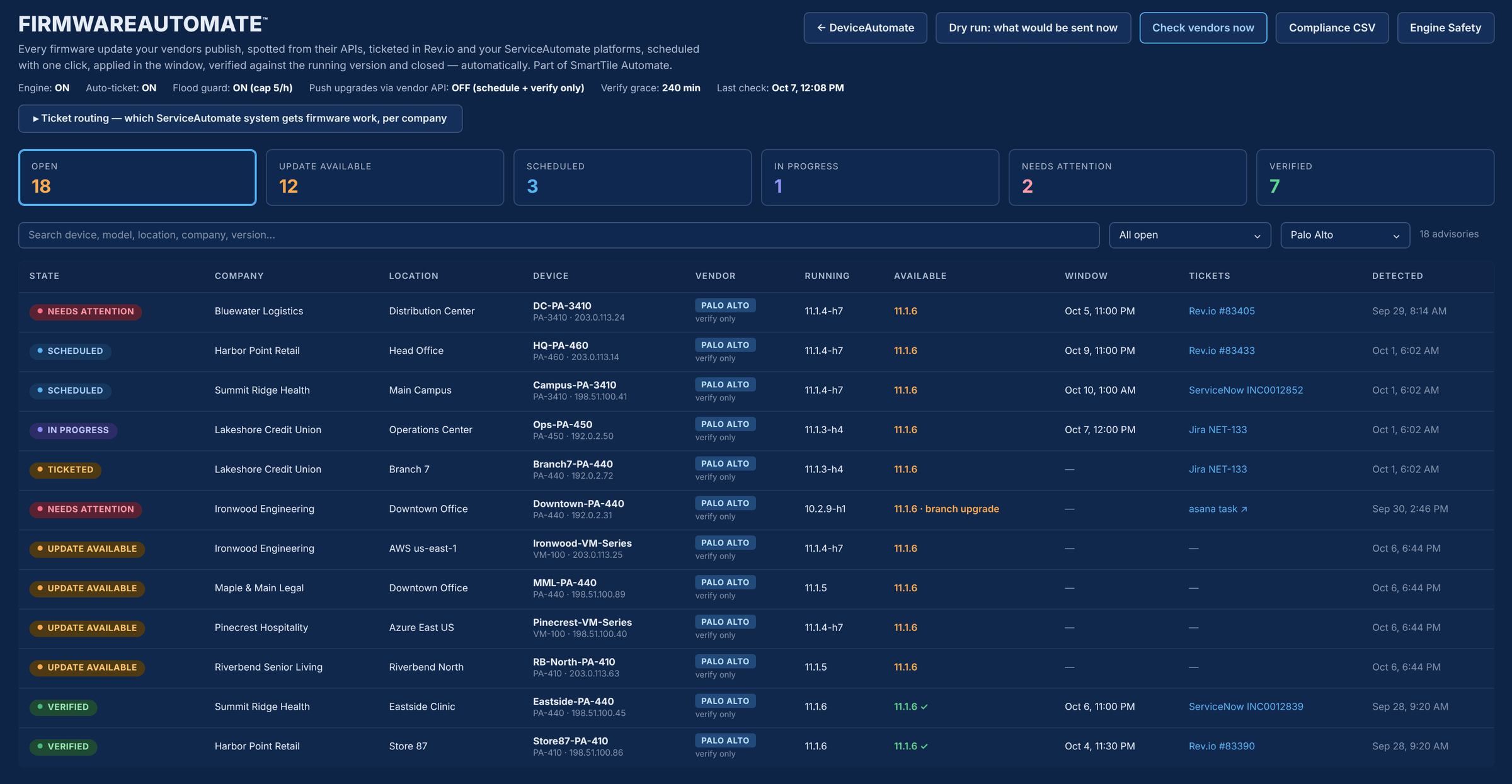
PAN-OS advisories, never a risky jump
Target is the newest release on your running branch, or the next feature release flagged as a planned upgrade. Verified after the window.
Admin access watched
Every admin sign-in, failed sign-in and configuration command, with user and source address, from the firewall’s own logs.
When something goes wrong on the firewall
| The moment | Today | With SmartTile |
|---|---|---|
| The HA peer drops | Ping still says the firewall is up. | HA state is read every 5 minutes and the lost peer opens one alert. |
| A license is about to lapse | Found the day protection stops. | License expiry is tracked and raised as a problem before it lapses. |
| A rule is edited overnight | Nobody knows until something breaks. | The hourly read logs exactly which rule changed and how. |
| An admin sign-in fails | Buried in the firewall’s own logs. | AccessAutomate records it with the user and source address. |
Why IT leaders add it to their stack
Works beside Panorama, nothing to replace
SmartTile adds tickets and history next to your other vendors. It does not manage configuration.
Hardware and VM-Series alike
PA-series and VM-Series in AWS, Azure or on-prem, through the PAN-OS XML API over HTTPS 443.
Every sign-in and config command recorded
Admin sign-ins, failed logins and configuration commands, from a role with XML API reads only.
Problems routed to the right engineer
One event per new problem can open an Asana task for the engineer who owns the firewall.
Live with one read-only admin
-
1Create an admin roleXML API reads only: Operational Requests, Configuration, Export and optionally Log.
-
2Add a dedicated API adminNot a person’s login.
-
3Let SmartTile inPermit SmartTile’s monitoring address on the management interface, port 443.
-
4Connect and testTest shows hostname, model and PAN-OS version, and pins the certificate fingerprint.
Nothing installed on the firewall, no inbound rule to the LAN and no policy change. Delete the API admin and access ends.
Security and control
Learn exactly how it works
The two-page technical overview lists every PAN-OS command SmartTile runs, the XML API permission each feature needs, and how the key and certificate are protected. Built for your change board.
Palo Alto Networks integration FAQs
Will SmartTile have write access to our firewall?
No. The role allows XML API reads only, and SmartTile’s PAN-OS client has no write command. PAN-OS upgrades stay with your engineer.
We already have Panorama. What does SmartTile add?
A different job. SmartTile puts the firewall next to your circuits, switches and access points, with tickets in your ITSM. It does not manage configuration.
Does it support VM-Series in the cloud?
Yes. Hardware PA-series and VM-Series in AWS, Azure or on-prem are all supported. A VM-Series already in SmartTile as a cloud instance keeps its record.
Does SmartTile install PAN-OS upgrades?
No. SmartTile raises the advisory and verifies the running version after your window. An engineer performs the upgrade.
What permissions does the Palo Alto firewall monitoring integration need?
An admin role with XML API Operational Requests, Configuration and Export. Add Log if you want admin sign-in tracking. Everything else stays off.
Works with the rest of your stack
One read-only admin, and your Palo Alto joins the pane your NOC already watches
See it on your own firewalls in a 30-minute demo.