Kaseya IT Glue, filed for you from your network
The SmartTile Kaseya IT Glue integration files reports, network diagrams and documents into the right IT Glue organization automatically, and syncs devices as configurations, so your documentation stays current without anyone filing it.
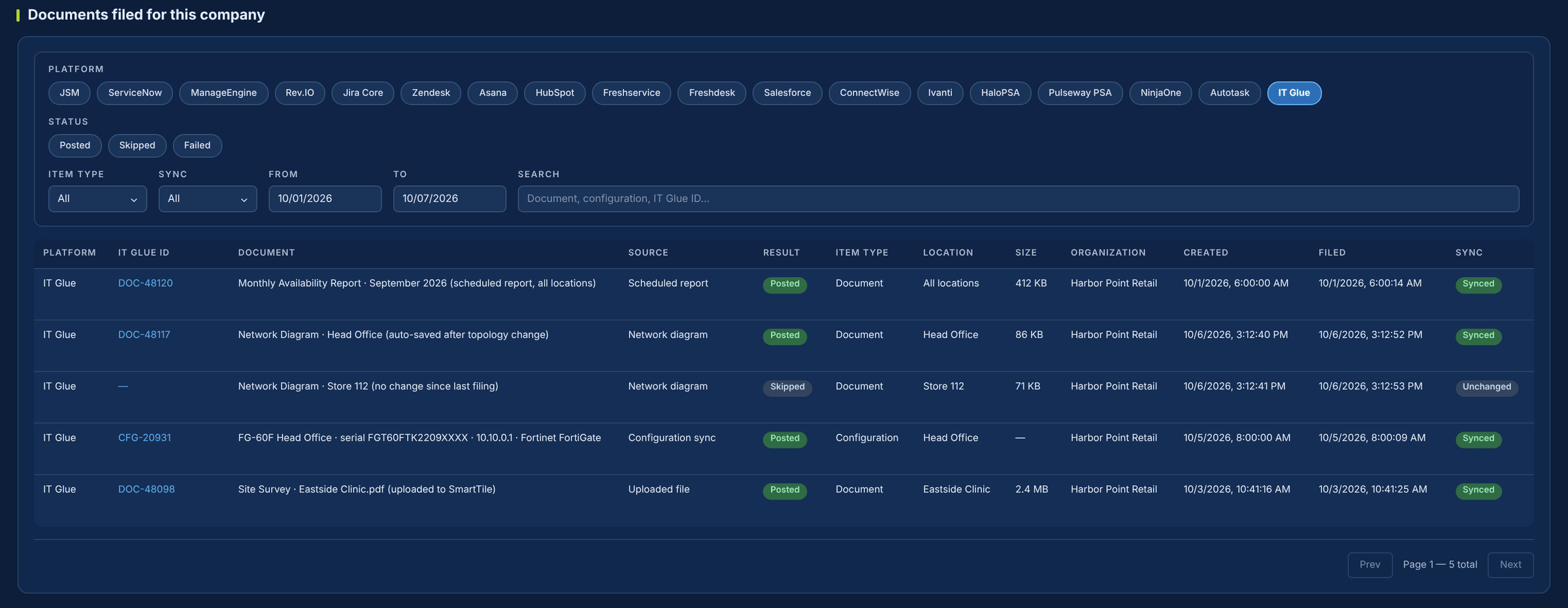
Documentation is only useful if someone files it.
Scheduled reports sit in inboxes, network diagrams go stale, and device configurations get hand-typed or skipped. SmartTile pushes them into the IT Glue organization you map, and skips anything that hasn’t changed.
What your team gets from the Kaseya IT Glue integration
Scheduled reports filed automatically
Each scheduled report is posted to IT Glue as a titled document the moment it runs.
Network diagrams that stay current
Each location’s auto-saved diagram is pushed to IT Glue. Unchanged diagrams are skipped.
Uploads copied for you
Files uploaded to SmartTile are copied to IT Glue in the background, without slowing the upload.
Devices become configurations
Name, serial, IP, hostname, vendor, model, type, location and notes, matched by serial or name and updated or created.
No duplicates
A checksum check stops the same content from being filed twice for the same company.
A record of every filing
Each push is logged as posted, skipped or failed, with the IT Glue ID.
Where documentation slips today
| The moment | Today | With SmartTile |
|---|---|---|
| A scheduled report runs | It sits in an inbox until someone files it. | It’s posted to IT Glue as a titled document. |
| The network changes | Exported diagrams go out of date. | The current diagram is pushed. Unchanged ones are skipped. |
| Someone uploads a document | It stays in SmartTile only. | It’s copied to IT Glue in the background. |
| A device is added | Its configuration is hand-typed, or missing. | It’s matched by serial or name, then updated or created. |
| Was it filed? | Nobody knows. | Logged as posted, skipped or failed, with the IT Glue ID. |
Why IT leaders add it to their stack
Current documentation without the staff time
Reports, diagrams and configurations file themselves into the system you already trust.
IT Glue REST API, any region
US, EU and AU instances, with one key mapped to one organization per company.
Never reads passwords
SmartTile never retrieves passwords or flexible assets. It reads only organization names and configurations for matching.
Audit-ready, always
Every filing is logged, so you can show what was documented and when.
Live with one API key
-
1Create an API keyIn IT Glue, under Account and API Keys. Note your region.
-
2Connect and testPaste the key in SmartTile, choose the region, save and test.
-
3Map the organizationPick the IT Glue organization from the list.
-
4Choose what to fileTurn on reports, diagrams, documents and configuration sync as you need them.
Each company connects its own key, mapped to its own IT Glue organization. All four filing switches start off.
Security and control
Learn exactly how it works
The two-page technical overview lists exactly what SmartTile files, every IT Glue API call it makes, and what it will never read. Built for the person who owns your documentation.
Kaseya IT Glue integration FAQs
Will SmartTile flood IT Glue with duplicates?
No. A checksum check prevents identical content from being filed again for the same company.
Do you support EU and AU instances?
Yes. You choose the region when you connect, and SmartTile targets that instance.
Can SmartTile overwrite our device configurations?
Only if you turn on configuration sync, which is a separate switch that is off by default.
What happens if IT Glue is down?
Pushes are isolated. Failures are logged without interrupting reports, diagrams or uploads.
What does the Kaseya IT Glue integration file automatically?
Scheduled reports, network diagrams, uploaded documents up to 7 MB and, if you enable it, device configurations, each controlled by its own switch.
Works with the rest of your stack
The report you would have filed by hand is already in IT Glue, under the right organization
See it with your own IT Glue in a 30-minute demo.