Kaseya BMS and Pulseway PSA, ticketed for you when a site goes down
One SmartTile connector opens the service desk ticket on a confirmed outage, keeps private notes current, and resolves it when the site is back, by the rule you set.
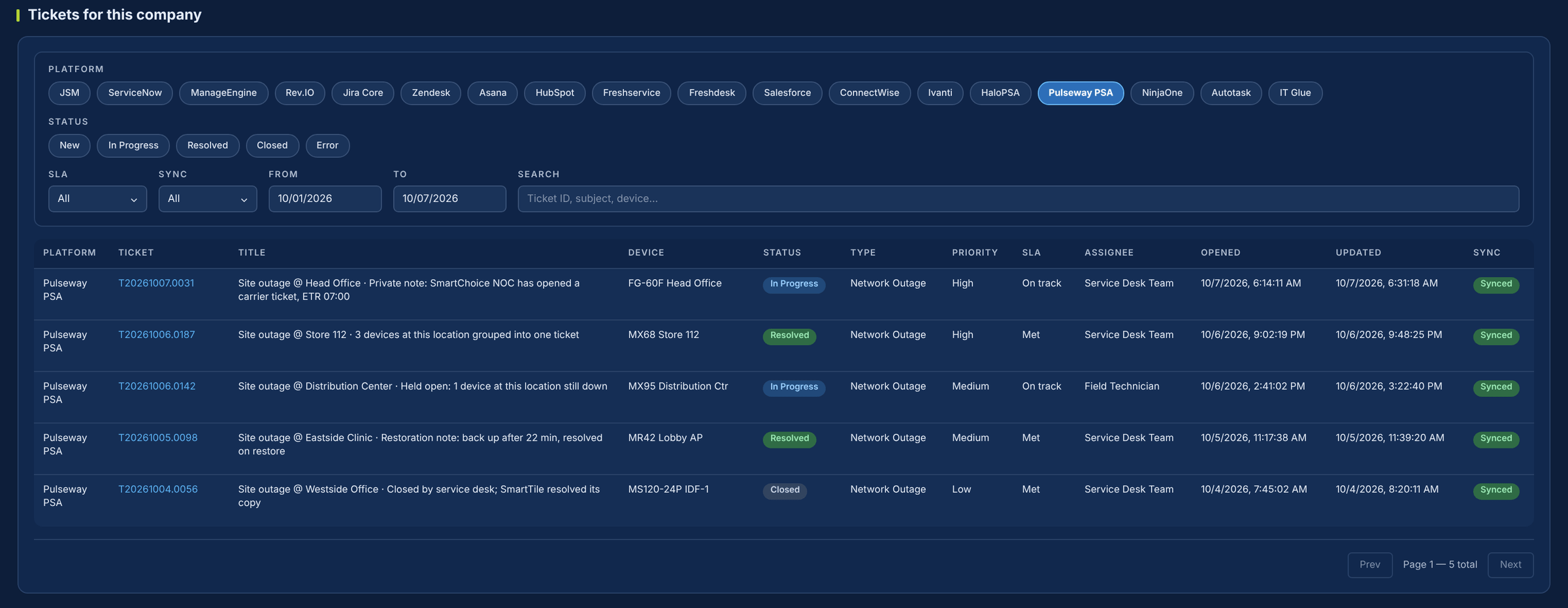
Your service desk shouldn’t depend on someone reading an alert email.
Today someone reads the alert, types the ticket, pastes in updates and remembers to close it. SmartTile opens the ticket on the account and location you choose, keeps it current with private notes, and closes it when the site is back.
What your team gets from the Kaseya BMS / Pulseway PSA integration
The ticket opens itself
After the open delay you set, a Service Desk ticket opens on your account and location. Short blips are ignored.
One ticket per location
Several devices at one site share one ticket by default. Switch to one per device if you prefer.
Private notes as the outage evolves
SmartChoice and CarrierAutomate updates are added as agent-private notes automatically.
Technician notes reach the NOC
Notes are carried to the SmartChoice ticket every 5 minutes, and journals come back the same way.
Resolved by your rule
On restore, after the site has been up a set time, or manually. A ticket stays open while any device at the site is down.
Both desks agree
Status is read back every 5 minutes, so closing it in your service desk resolves it in SmartTile too.
Where the service desk’s time goes today
| The moment | Today | With SmartTile |
|---|---|---|
| A site goes down | Someone reads the alert and types the ticket. | A ticket opens after the open delay. Blips are ignored. |
| Several devices at one site | Separate tickets to merge by hand. | One ticket per location, or per device if you choose. |
| The outage evolves | Email updates pasted in, or missed. | SmartChoice and carrier notes are added as private entries. |
| A technician adds a note | The NOC never sees it. | Carried to the SmartChoice ticket every 5 minutes. |
| The site recovers | Someone closes it, often late. | A restoration note and resolution, per your policy. |
| Your team closes it first | The two systems disagree. | SmartTile reads the status back and resolves its own copy. |
Why IT leaders add it to their stack
Your service desk stays the system of record
Nothing to replace. Outages arrive where your team already works.
One connector, two products
Kaseya BMS and Pulseway PSA share the same REST API v2, so one connector covers both.
A dedicated API user, never a person
Passwords are encrypted and never logged, and authentication calls are kept out of API logs.
No duplicates, no forgotten tickets
One ticket per location, closed by your rule when the site is back.
Live with one API user
-
1Create a dedicated API userWith rights to create and edit Service Desk tickets and notes.
-
2Open the SmartTile setupServiceAutomate, IT Platform Integrations, Pulseway PSA.
-
3Enter your tenant and credentialsFor Kaseya BMS, point the API server to api.bms.kaseya.com.
-
4Test and choose your defaultsAccount, location, ticket type, priority and sync policy.
Run the Lab round-trip before switching it on, and every ticket action is logged from day one.
Security and control
Learn exactly how it works
The two-page technical overview lists every REST API v2 call SmartTile makes, each setting that controls grouping, notes and closing, and how credentials are protected.
Kaseya BMS / Pulseway PSA integration FAQs
Does it work with Kaseya BMS as well as Pulseway PSA?
Yes. They are the same product and API. Point the API server to api.bms.kaseya.com and the setup is identical.
Will monitoring flood our service desk?
No. Tickets group per location by default, the open delay filters out blips, and no duplicate opens during an active outage.
Will customers see SmartTile’s notes?
Not by default. Notes are agent-private unless you choose to make them customer-visible.
What happens if a site fails again after the ticket is closed?
A new ticket opens. SmartTile does not reopen closed tickets for this integration today.
How does the Kaseya BMS integration close tickets?
On restore, after the site has been up a set number of minutes, or manually, by the policy you choose. It stays open while any device at the site is down.
Works with the rest of your stack
The ticket is already in your service desk, and it closes itself when the site is back
See it in your own Kaseya BMS or Pulseway PSA in a 30-minute demo.