Kaseya Autotask, with the outage already in it
The SmartTile 2.0 Autotask network monitoring integration opens the Autotask ticket for a down site, lists every affected device, and completes it when the site recovers.
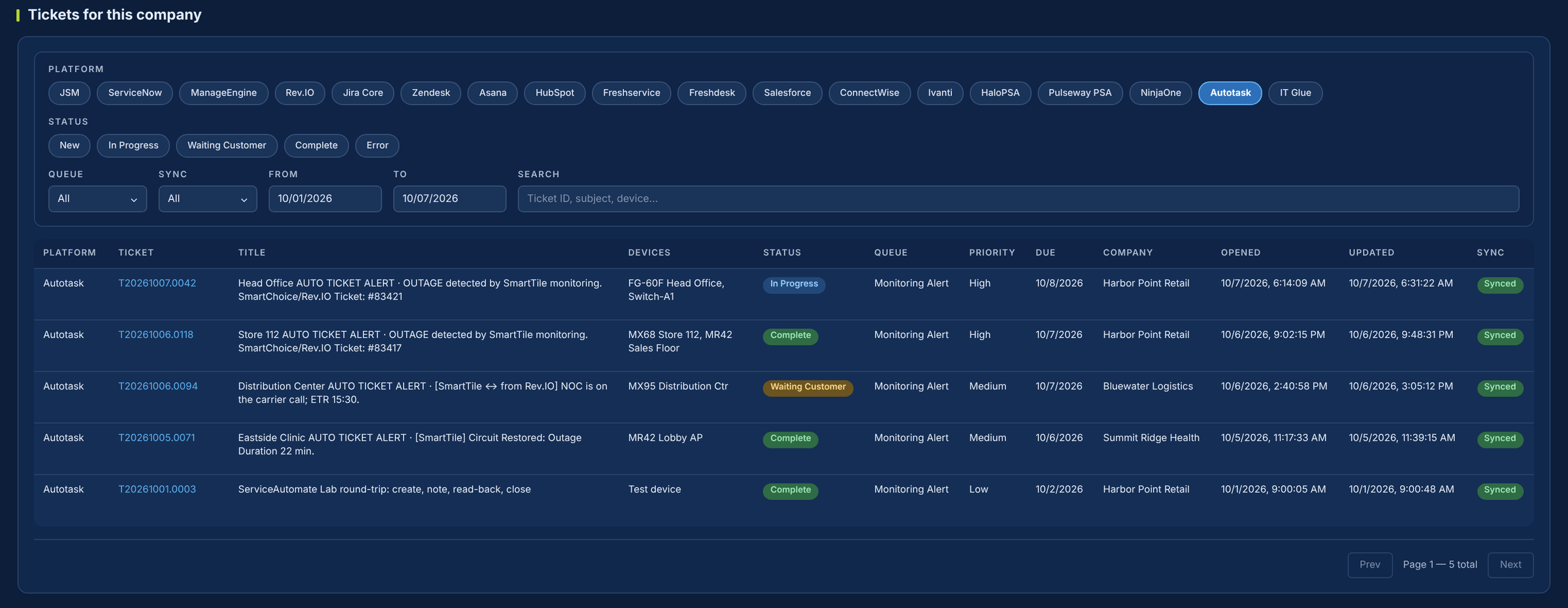
If your team lives in Autotask, outages should show up there.
Today an alert email arrives, and someone opens Autotask, creates the ticket and hunts down the circuit. SmartTile 2.0 opens the ticket on the company, queue and priority you picked, with every down device and the SmartChoice ticket number already in it.
What your team gets from the Kaseya Autotask integration
The ticket opens itself
When a site goes down, a ticket opens on your Autotask company, queue, priority and status, with every down device and the SmartChoice ticket number.
One ticket per site
Five devices down at one site is one ticket, the same outage SmartChoice tickets once.
Your own picklists
Queue, priority and status values are read live from your Autotask, so tickets land where your team expects.
Completed when the site is back
A restoration note with the outage duration, then Complete, or leave it open if you close your own tickets.
Notes in both directions
Your technicians’ notes reach SmartChoice within 5 minutes, and SmartChoice’s updates come back the same way.
Opt out any device
Switch Autotask off for one device and the rest of the site still tickets.
What changes in Autotask
| The moment | Today | With SmartTile 2.0 |
|---|---|---|
| A site goes down | An alert email. Someone creates the ticket and finds the circuit. | A ticket opens by itself with every down device and the SmartChoice ticket number. |
| Five devices at one site | Five tickets for one outage. | One ticket for the site. |
| It comes back | Someone completes it, or forgets. | A restoration note with duration, then Complete if your policy says so. |
| Your tech adds a note | SmartChoice never sees it. | Carried to the SmartChoice ticket within 5 minutes. |
| A device you don’t want ticketed | Close the ticket every time it drops. | Switch Autotask off for that device. |
Why IT leaders add it to their stack
Autotask stays your system of record
Nothing to replace. Outages show up where your team already works.
Autotask REST API, zone found for you
SmartTile 2.0 discovers your zone automatically and reads your picklists live.
Encrypted, admin-only, fully logged
Credentials are encrypted and masked. Every call is logged without its headers.
No duplicates, no forgotten tickets
One ticket per outage, completed when the site recovers.
Live with one API user
-
1Create an API userIn Autotask Admin, note the username, secret and integration code.
-
2Connect and testPaste the three values. SmartTile 2.0 finds your zone and loads your picklists.
-
3Choose where tickets landCompany, queue, priority, statuses and close policy.
-
4Enable and prove itSwitch it on and run the Lab round-trip.
The ServiceAutomate Lab runs create, note, read-back and close against your Autotask, with your credentials, before anything goes live.
Security and control
Learn exactly how it works
The two-page technical overview lists every Autotask API call SmartTile 2.0 makes, the settings that control queue, priority and close policy, and how credentials are protected.
Kaseya Autotask integration FAQs
Will we get duplicate tickets?
No. SmartTile 2.0 opens one Autotask ticket per site outage, and any device can be opted out.
We complete our own tickets. Can SmartTile 2.0 leave them open?
Yes. Choose the close policy that adds a restoration note only.
Is the integration Kaseya-ready?
Yes. It is built for Kaseya Autotask, formerly Datto PSA, on the same contract as every ITSM SmartTile 2.0 supports.
How does the Autotask network monitoring integration handle a whole-site outage?
It opens one ticket for the site and lists every device that is down, along with the SmartChoice ticket number.
Which other Kaseya products does SmartTile 2.0 support?
Kaseya BMS and Kaseya IT Glue.
Works with the rest of your stack
The outage is already an Autotask ticket, with SmartChoice’s carrier work in the notes
See it in your own Autotask in a 30-minute demo.