Every FortiGate fully visible, through one read-only API user
The SmartTile 2.0 FortiGate monitoring integration turns a ping-only firewall into a fully observed one: health, VPN tunnels, rule changes, config backups and firmware, with tickets in the ITSM your team already uses.
A FortiGate watched by ping says up or down. Nothing else.
FortiOS already knows the answers your NOC and security team ask for: which tunnel dropped, which rule changed, which build is behind. SmartTile 2.0 reads them through the FortiOS REST API and puts your FortiGate next to your circuits, switches and access points, with tickets where your team works. It never writes a rule.
What your team gets from the Fortinet FortiGate integration
Know every rule change, field by field
SmartTile 2.0 re-reads the full policy rule base hourly and logs every rule added, removed or modified, with a 90-day view of what changed.
Config backups that only save what changed
The full configuration is pulled on the device’s backup schedule, saved only when it changes, with a diff. A change can raise a ticket.
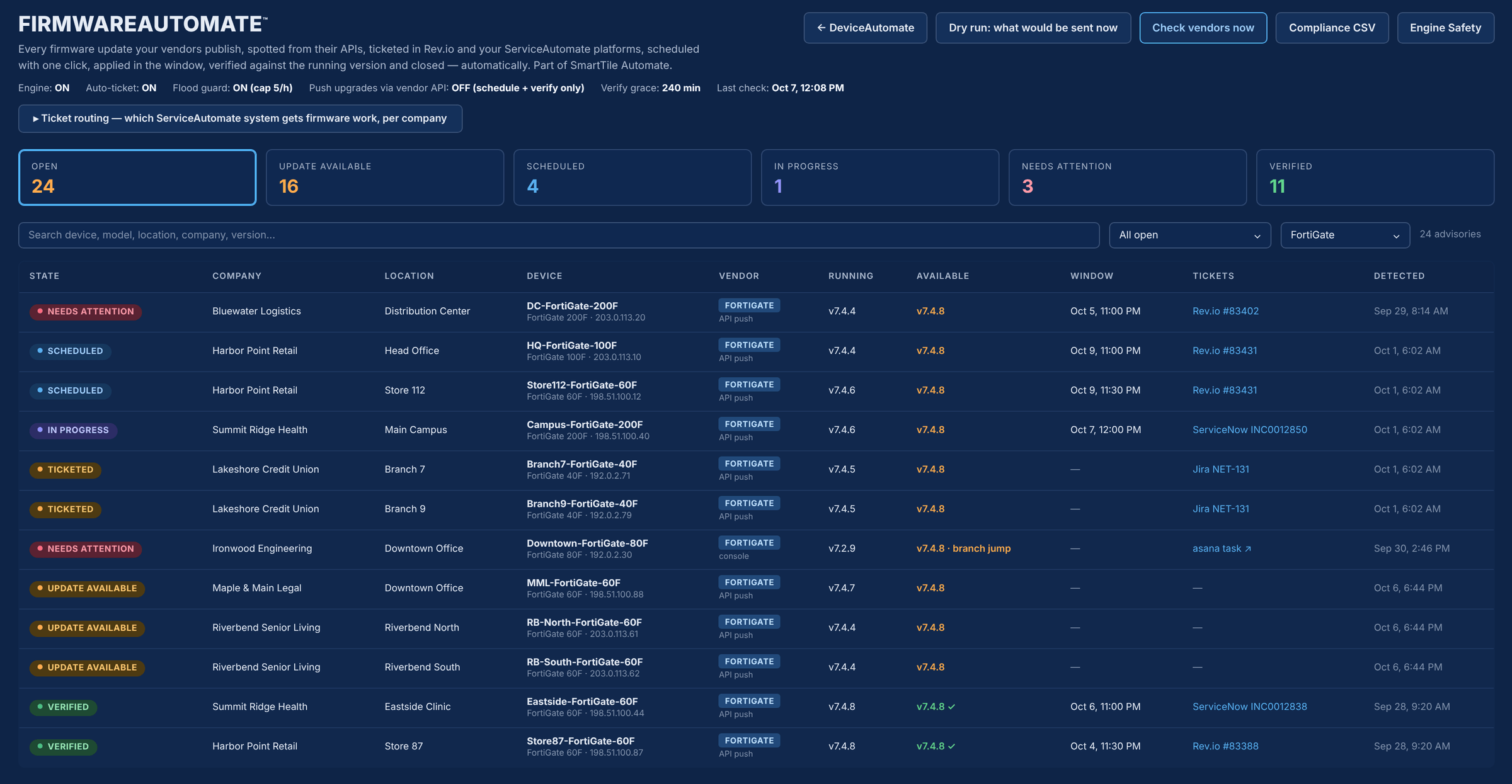
Firmware tracked from advisory to verified close
New FortiGuard builds become tickets with a 14-day SLA. SmartTile 2.0 verifies the running version after your window and closes the ticket itself.
Health beyond up or down
CPU, memory, session count, interface link state and uptime, in the device’s Analytics view and in Device Health.
Every VPN tunnel in view
Each IPsec tunnel’s state, selectors, subnets and traffic, plus the count of active SSL-VPN sessions.
Uptime you can defend
Uptime uses the FortiGate’s boot counter and the outages SmartTile 2.0 recorded. It never reports 100% just because nothing was heard.
When something changes on the firewall
| The moment | Today | With SmartTile 2.0 |
|---|---|---|
| Someone edits a rule overnight | Nobody knows until something breaks. | The hourly read logs exactly what was added, removed or modified. |
| The config changes | The last backup is whenever someone remembered to take one. | A new backup is saved with a diff, and the change can raise a ticket. |
| A new FortiGuard build ships | Someone reads vendor bulletins for every model you own. | One ticket per FortiGate with a 14-day SLA, closed once the upgrade is verified. |
| The connection test fails | A timeout and a guess. | A plain-language reason: wrong port, HTTPS admin closed, or token rejected. |
Why IT leaders add it to their stack
Works beside FortiManager, not instead of it
Nothing to replace. SmartTile 2.0 adds outage tickets and history without managing your configuration.
One pane across every vendor
FortiGate sits beside your circuits, switches and access points through the FortiOS REST API, with no agent and no SNMP required.
An audit trail for every rule and config
Rule change history and config diffs from a read-only user that cannot change configuration.
Firmware handled, not chased
Advisories are ticketed, scheduled, verified and closed, so nothing falls behind between maintenance windows.
Live in ten minutes, read-only
-
1Create a read-only API userGenerate the key in FortiOS and paste it into SmartTile 2.0.
-
2Confirm HTTPS admin accessEnabled on a reachable interface and port.
-
3Allow two trusted hostsLimit the API user to SmartTile 2.0’s two monitoring addresses.
-
4Test the REST API connectionGreen shows the hostname and FortiOS version it reached.
No agent, no SNMP required, no inbound rule to the LAN and no change to production policies. Delete the API user and access ends.
Security and control
Learn exactly how it works
The two-page technical overview lists every FortiOS API call SmartTile 2.0 makes, the access level each feature needs, and a change summary with risk and rollback for each step. Built for your change board.
Fortinet FortiGate integration FAQs
Will SmartTile 2.0 have write access to our FortiGate?
No. The API profile is read-only and every monitoring call is a read. Firmware execution is the only write, and it stays off unless you switch it on.
Is our FortiGate API token safe with SmartTile 2.0?
Yes. It is never shown back or logged, it is sent only as a header, and it works only from the two addresses you allow.
We already have FortiManager. What does SmartTile 2.0 add?
A different job. SmartTile 2.0 puts the FortiGate next to your circuits, switches and access points, with tickets in your ITSM. It does not manage configuration.
What access does the FortiGate monitoring integration need for config backups?
Config backups need a super_admin profile, because FortiOS refuses the backup call to anyone less. It still only reads. Everything else works with a read-only user.
Do we need an agent or SNMP?
No. SmartTile 2.0 uses the FortiOS REST API over your HTTPS admin port. There is no agent, no SNMP requirement and no inbound rule to the LAN.
Works with the rest of your stack
Ten minutes on the firewall, and your FortiGate joins the pane your NOC already watches
See it on your own firewalls in a 30-minute demo.