Cisco Meraki Monitoring Integration That Tickets Every Outage for You
The SmartTile 2.0 Cisco Meraki monitoring integration watches every Meraki MX security appliance, MS switch and MR access point every 30 seconds and puts them on the same pane as your circuits. When a device drops, a license nears expiry or a VPN tunnel fails, the ticket is already open at the right site in the ITSM your team works in.
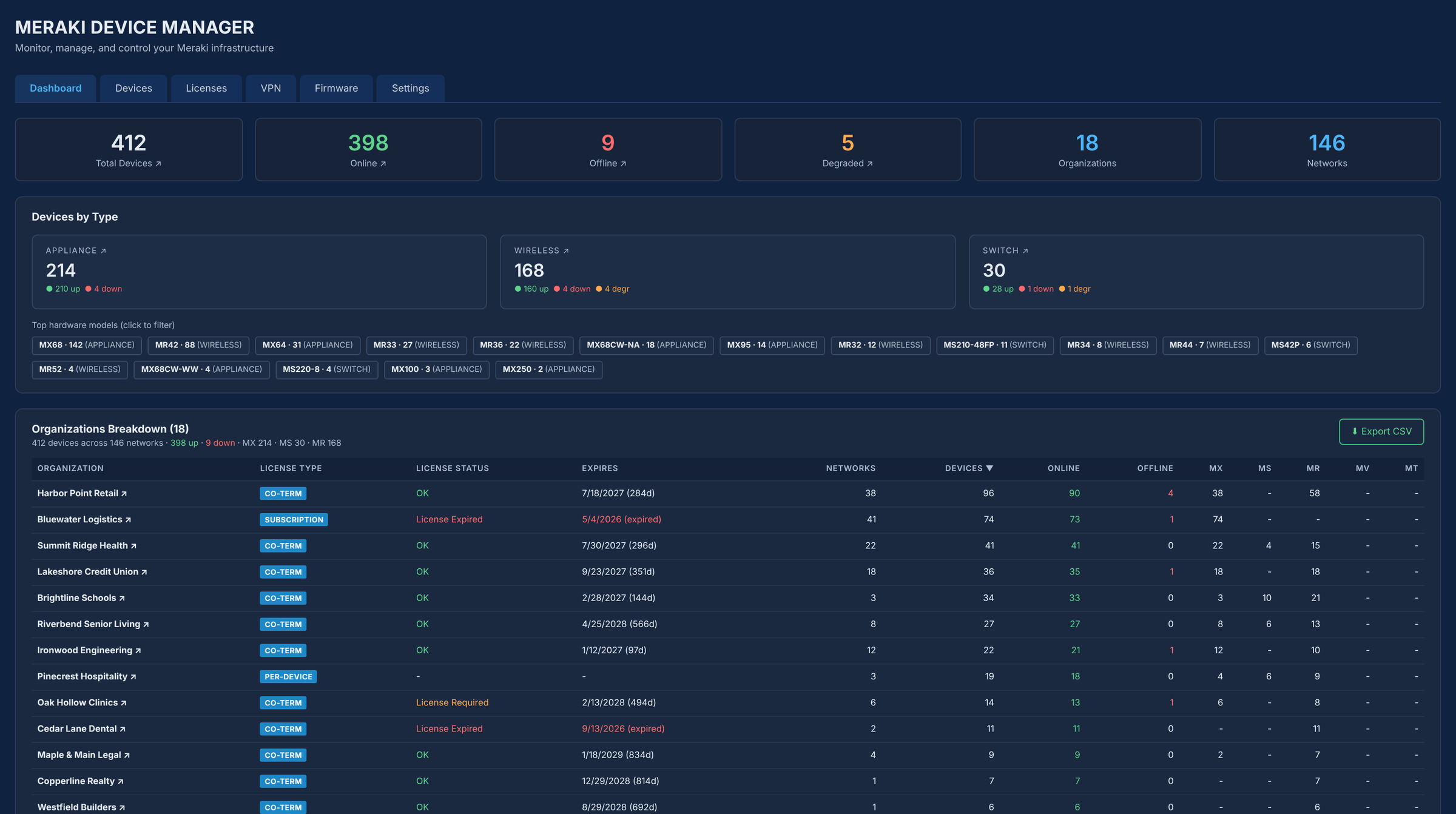
Meraki Dashboard alerts stop at email. Someone still has to be looking.
Meraki knows the moment an access point drops, an uplink loses packets or a license nears expiry. But its alert stops at an email. SmartTile 2.0 keeps the Meraki you already own and adds the part that’s missing: it records the outage, opens the ticket at the right site, and keeps the history next to your circuits and every other vendor.
For multi-location IT teams and MSPs managing dozens or hundreds of Meraki networks, that gap is where outages, expired licenses and unexplained WAN slowdowns slip through. Cisco Meraki network monitoring in SmartTile 2.0 turns every Meraki alert into a tracked ticket in ServiceNow, Kaseya Autotask, ConnectWise PSA or the ITSM you already run, with the evidence your team needs to close it.
What your team gets from the Cisco Meraki integration
Meraki outages become tickets, not emails
When a Meraki device stays offline past your threshold (14 minutes by default), SmartTile 2.0 emails the NOC and opens a ticket at that site in your ITSM. When it recovers, a restored email follows, so the ticket shows the full outage window.
No more surprise Meraki license expirations
Meraki licenses and subscriptions are checked every minute, with expiration warnings at 90, 60, 30, 15, 5 and 1 days, and co-term date shifts caught automatically. Renew on schedule instead of finding out when traffic stops.
Proof for every WAN complaint
Packet loss and latency on every Meraki MX uplink are kept for 35 days, with threshold tickets on loss, latency, temperature and bandwidth. When a site says the internet is slow, you can show whether it is the circuit, the carrier or the LAN.
Know when monitoring goes blind
If the Meraki Dashboard API goes quiet, devices turn UNKNOWN, never green, and the NOC is told monitoring is blind. Silence is never mistaken for uptime.
Meraki VPN tunnels watched, not assumed
AutoVPN pairs and third-party IPsec peers are checked every 60 seconds. A watched tunnel down for 3 minutes opens one ticket, not a flood of duplicate alerts, so site-to-site connectivity is monitored around the clock.
Every config change has a name
Each Meraki Dashboard configuration change is logged with the admin who made it, giving you a clear change audit trail. Firmware advisories track what is running on each device against what is available.
When something goes wrong in your Meraki network
| The moment | Today | With SmartTile 2.0 |
|---|---|---|
| An AP drops off | Someone notices in the Dashboard, or a user calls. | The device goes DOWN after your threshold, the NOC is emailed and a ticket opens at that site. |
| The API goes quiet | Everything stays green because nothing says otherwise. | Three failed status reads turn devices UNKNOWN, and the NOC is told monitoring is blind. |
| A device leaves its network | It shows the last good status for weeks. | Flagged as not in any network, with who removed it and when. |
| A license is expiring | Discovered the day it stops passing traffic. | A countdown of emails from 90 days out. |
Why IT leaders add the Cisco Meraki integration to their stack
More from the Meraki you already pay for
Nothing to replace. SmartTile 2.0 turns your existing Meraki investment into automated tickets and history.
One pane across every vendor
Meraki sits beside your circuits, firewalls and ITSM through the Dashboard API v1, with no agent or appliance.
Read-only by default, every action logged
A read-only key powers monitoring. Every Dashboard config change is recorded with the admin’s name.
Fewer missed outages and lapsed licenses
Your team works the fix while SmartTile 2.0 handles the alert, the ticket and the license countdown.
Set up Cisco Meraki monitoring with one API key
-
1Enable API access in MerakiOne checkbox under Organization settings in the Meraki Dashboard.
-
2Generate a Meraki API keyRead-only works for all monitoring features.
-
3Paste it into SmartTileDiscovery of every organization, network and device starts at once.
-
4Pick devices and set your thresholdPreview, import and choose who gets alerted.
No agent, no appliance, no inbound firewall rule. SmartTile 2.0 calls the Meraki cloud, never your network.
Security and control for your Meraki API key
Learn exactly how the Meraki integration works
The two-page technical overview covers every API call SmartTile 2.0 makes to the Meraki Dashboard, the permissions each feature needs, and how your key is protected. Built for the engineer who will sign off on it.
Cisco Meraki integration FAQs
The Meraki Dashboard already alerts. Why add SmartTile 2.0?
Meraki sends an email. SmartTile 2.0 records the outage, opens the ticket at the right site in your ITSM, and keeps the history next to your circuits and other vendors.
Will SmartTile 2.0 change our Meraki configuration?
Monitoring only reads. Actions that change a device need a full-admin key and a permitted user, and firmware windows and VPN auto-heal stay off until you turn them on.
Does the Cisco Meraki monitoring integration need an agent or appliance?
No. SmartTile 2.0 calls the Meraki cloud with one API key per company. There is no agent, no appliance and no inbound firewall rule.
Which Meraki products are covered?
Every organization, network and device the key can see, including MX, MS, MR, MG, MV and MT.
Our key sees many organizations. Can we limit what SmartTile 2.0 shows?
Yes. Hide the organizations you don’t want and import only the devices you pick.
How often does SmartTile 2.0 check Meraki device status?
Device status is read from the Meraki Dashboard API every 30 seconds, VPN tunnels every 60 seconds and licensing every minute. A ticket opens once a device stays offline past your threshold, which is 14 minutes by default.
How do Meraki license expiration alerts work?
SmartTile 2.0 emails warnings at 90, 60, 30, 15, 5 and 1 days before a Meraki license expires, and catches co-term date shifts automatically when licenses are added or changed.
Works with the rest of your stack
One API key, and the Meraki you already own opens its own tickets
See it on your own estate in a 30-minute demo.