Proven strategies. Real results.
Trusted expertise.
Explore our case studies and insights to learn how our unified, cloud-based solutions and signature service model deliver performance, compliance, and lasting impact across industries.
5 Common Challenges in Telecom Management and How a Managed Services Provider Can Solve Them
The telecommunications industry has undergone significant transformation over the past few decades, adapting to technological advancements and increasing demand for seamless connectivity. However, this evolution has brought forth a myriad of challenges that telecom management must navigate.
In this article, we will explore five common challenges in telecom management—network complexity, rising costs, security threats, compliance and regulatory issues, and resource management—and discuss how a Managed Services Provider (MSP) can effectively address these challenges. By leveraging the expertise and resources of an MSP, businesses can streamline their operations and enhance their overall telecom management strategies.
Challenge 1: Network Complexity What contributes to network complexity?Network complexity in telecommunications is often a result of multiple factors, including the integration of various technologies, an increasing number of devices, and the demand for high-speed data services. As organizations implement new technologies such as VoIP, cloud services, and IoT devices, the network becomes more intricate, leading to potential bottlenecks and service degradation. Additionally, the need for interoperability between legacy systems and modern solutions exacerbates this issue, making it challenging for telecom managers to maintain a cohesive network environment.
How does network complexity affect operations?Increased network complexity can have a detrimental effect on operational efficiency. It can result in higher downtime, complicate troubleshooting processes, and lead to inefficient resource utilization. Moreover, managing a complex network often requires specialized knowledge and skills, which may not be readily available within an organization’s existing workforce. This can cause delays in implementing necessary upgrades or resolving issues, ultimately impacting customer satisfaction and business performance.
How can a Managed Services Provider simplify network management?A Managed Services Provider can simplify network management by offering comprehensive solutions tailored to the specific needs of the business. MSPs have the expertise and tools to monitor and manage networks proactively, ensuring optimal performance and minimizing downtime. By handling routine maintenance, upgrades, and troubleshooting, an MSP allows internal teams to focus on strategic initiatives and core business activities. Additionally, by leveraging automation and advanced analytics, MSPs can enhance visibility into network performance, making it easier to identify and address potential issues before they escalate.
Challenge 2: Rising Costs What are the main factors driving telecom costs?Telecom costs are influenced by various factors, including increased demand for data and voice services, the necessity for advanced infrastructure, and regulatory fees. As customers expect more from their telecom providers, businesses must invest in upgrading their systems to meet these demands, often resulting in higher operational expenditures. Additionally, the costs associated with maintaining and securing the network infrastructure can be significant, further straining budgets.
How do rising costs impact businesses?Rising telecom costs can lead to budget constraints and impact overall profitability, forcing businesses to make difficult decisions about resource allocation. This can hinder innovation and limit the ability to invest in new technology or services. Furthermore, if not managed properly, increased costs can lead to reduced competitiveness in the market, as businesses struggle to keep up with evolving customer expectations and technological advancements.
How can a Managed Services Provider reduce telecom expenses?A Managed Services Provider can help businesses reduce telecom expenses through various strategies, including optimizing resource usage, negotiating better vendor contracts, and streamlining operations. By conducting a thorough assessment of existing telecom expenditures, an MSP can identify areas for cost savings and implement solutions aimed at improving efficiency. Additionally, MSPs often have access to bulk purchasing power, enabling them to secure better rates on hardware and services, which can translate to significant savings for their clients.
Challenge 3: Security Threats What types of security threats are prevalent in telecom?The telecom sector is increasingly vulnerable to a range of security threats, including cyberattacks, data breaches, and insider threats. As networks become more interconnected and reliant on digital technologies, the attack surface widens, providing cybercriminals with more opportunities to exploit vulnerabilities. Common threats include Distributed Denial of Service (DDoS) attacks, ransomware, and phishing schemes, which can compromise sensitive customer data and disrupt services.
How do security threats impact telecom services?Security threats can have far-reaching consequences for telecom services, including loss of customer trust, legal ramifications, and financial losses. A successful cyberattack can lead to service outages, affecting not only the telecom provider but also the businesses and consumers relying on their services. Furthermore, regulatory penalties for failing to protect customer data can add additional financial burdens, making it crucial for telecom companies to prioritize security measures.
How can a Managed Services Provider enhance security measures?A Managed Services Provider can enhance security measures by implementing a multi-layered security approach, incorporating firewalls, intrusion detection systems, and regular security audits. MSPs can also provide continuous monitoring and threat detection, ensuring that potential security breaches are identified and addressed before they can cause significant harm. Through employee training and awareness programs, MSPs can help organizations foster a culture of security, further minimizing the risk of insider threats and human error.
Challenge 4: Compliance and Regulatory Issues What compliance challenges do telecom companies face?The telecommunications industry must navigate a complex landscape of compliance and regulatory issues, including data privacy laws, industry standards, and local regulations. Laws such as the General Data Protection Regulation (GDPR) in Europe and the California Consumer Privacy Act (CCPA) in the United States impose strict requirements on how companies handle customer data. Additionally, telecom providers are often subject to regulations that mandate specific service quality levels, reporting obligations, and financial disclosures.
How can failure to comply affect a business?Failure to comply with regulatory requirements can lead to severe consequences, including hefty fines, legal challenges, and damage to brand reputation. Non-compliance can also result in operational disruptions as companies scramble to address deficiencies and implement corrective measures. This can divert resources and attention away from core business functions, ultimately hindering growth and innovation.
How can a Managed Services Provider assist with compliance?A Managed Services Provider can assist telecom companies with compliance by offering expertise in regulatory requirements and best practices. MSPs can conduct compliance audits, develop policies and procedures to meet regulatory standards, and implement monitoring solutions to ensure ongoing adherence. By leveraging their knowledge of the compliance landscape, MSPs can help organizations navigate the complexities of compliance, reducing the risk of violations and associated penalties.
Challenge 5: Resource Management What challenges arise from inadequate resource management?Inadequate resource management in telecom can lead to inefficient operations, wasted resources, and poor service delivery. As demand fluctuates, organizations may struggle to align their resources—such as personnel, technology, and budget—with business needs. This can create bottlenecks in service provision, result in overstaffing or understaffing, and ultimately affect customer satisfaction and loyalty.
How does inefficient resource management affect productivity?Inefficient resource management can significantly hinder productivity within a telecom organization. When resources are misallocated, projects may fall behind schedule, leading to missed deadlines and an inability to meet customer expectations. Additionally, employees may become overwhelmed with tasks or lack the necessary tools to perform their jobs effectively, resulting in decreased morale and higher turnover rates. These factors collectively contribute to a negative impact on the organization’s bottom line.
How can a Managed Services Provider optimize resource management?A Managed Services Provider can optimize resource management by providing strategic insights and data-driven recommendations. MSPs can analyze resource utilization patterns and identify inefficiencies, enabling organizations to allocate resources more effectively. By automating routine tasks and leveraging cloud solutions, MSPs can enhance agility and flexibility, allowing businesses to scale resources in response to changing demands. Furthermore, by providing access to specialized skills and knowledge, MSPs can help organizations augment their existing teams without the need for permanent hires.
ConclusionTelecom management presents a variety of challenges, from network complexity to rising costs and security threats. However, partnering with a Managed Services Provider can mitigate these issues and empower organizations to focus on their core competencies. By simplifying network management, reducing expenses, enhancing security, ensuring compliance, and optimizing resource allocation, MSPs play a crucial role in driving operational efficiency and improving service delivery in the telecommunications sector.
FAQs- What is a Managed Services Provider? A Managed Services Provider is a third-party organization that offers a range of IT services, including network management, security solutions, and compliance assistance, to help businesses optimize their operations.
- How can an MSP help with network security? An MSP can enhance network security through continuous monitoring, threat detection, and implementing multi-layered security measures to protect against cyber threats.
- What are the benefits of outsourcing telecom management? Outsourcing telecom management to an MSP allows businesses to leverage specialized expertise, reduce operational costs, and focus on strategic initiatives without the burden of day-to-day management.
- Can an MSP assist with compliance regulations? Yes, an MSP can help organizations navigate complex compliance regulations by providing expertise, conducting audits, and implementing necessary policies and procedures.
- How does an MSP optimize resource management? An MSP optimizes resource management by analyzing usage patterns, automating tasks, and providing access to specialized skills to ensure that resources are allocated effectively.


10 Best VoIP Service Providers in 2026 | SmartChoice
Many businesses waste months finding the right VoIP provider. They get burned by hidden fees, poor call quality, or features that don’t work as advertised. The result? Frustrated teams, lost productivity, and communication systems that hurt more than they help.
We analyzed the top VoIP providers based on call quality, features, pricing transparency, reliability, and actual customer support responsiveness. We also conducted a VoIP pricing comparison across commonly purchased tiers. This cloud phone system comparison serves as a business VoIP providers comparison that focuses on how business VoIP providers perform under real-world conditions and which hosted VoIP providers deliver the best balance of value and reliability.
In this guide we’ll break down the 10 best VoIP service providers for 2026, including their key features, communication channels, and pricing, plus where VoIP contact center solutions fit best. You’ll know exactly which provider fits your business size, budget, and requirements without wasting time on demos that don’t match your needs. We highlight top VoIP providers for various use cases, the best VoIP providers for small business, and where hosted VoIP providers and broader business VoIP providers excel.
SummaryThis guide ranks and compares the top 10 VoIP providers for 2026 based on call quality, features, pricing transparency, reliability, and real support performance. It highlights each provider’s best-fit use cases, core capabilities, and pricing to help businesses quickly align options with size, budget, and requirements. Emphasis is placed on real-world testing, scalability, and total cost clarity to avoid hidden fees and misaligned demos. Use it to shortlist providers for needs ranging from small business basics to enterprise-grade integrations and contact centers, then run a quick VoIP pricing comparison to validate total cost.
Top 10 VoIP Service Providers- SmartChoice
- Dialpad
- Google Voice
- Vonage
- Intermedia
- Ooma
- Grasshopper
- 8X8
- Nextiva
- Ring Central
Best For: Customer Support and Service for Enterprise Businesses
Communication Channels: Voice, SMS, Live Chat, Email, Microsoft Teams, Contact Center, Secure Cloud Fax
Unlimited Calling Area: US and Canada
SmartChoice is the ultimate voice, Wi-Fi, and managed connectivity provider throughout North America. Our holistic approach to business connectivity encompasses voice, internet, collaboration, and operational technology, all integrated into one scalable, reliable, and expertly managed solution. As one of the leading hosted VoIP providers serving North America, SmartChoice aligns with what many business VoIP providers promise—but delivers through fully managed, end-to-end execution.
We specialize exclusively in communication, connectivity, and collaboration, complementing existing IT teams and Managed Service Providers (MSPs) rather than replacing them. Our solution is built, engineered, and designed by us, for you.
While others focus on isolated communication channels, we integrate voice, internet, and collaboration tools into a cohesive system that enables businesses to scale efficiently and operate seamlessly.
Our team designs, implements, and optimizes infrastructure that provides standardized performance across all your locations. This approach ensures every site operates at the same high level of efficiency—whether you’re expanding locally or globally.
Key Features:
- Phased-approach PBX to Cloud — supports pbx to cloud migration
- Microsoft Teams integrations for Ucaas, Contact Center
- VoIP softphone, desk phone, and computer app setup
- White Glove Service with 24/7 365 US-based support
- No rip and replace — we integrate with legacy systems
Proprietary Hosted VoIP : enterprise-grade hosted VoIP solutions that offer crystal-clear communication across teams and geographies.
Microsoft Teams Integration: seamless integration with Microsoft Teams, enabling remote, hybrid, and global teams to collaborate effortlessly by unifying internal and external communication on a trusted platform. This allows for the centralization of Voice, Video, Chat, and SMS via native Microsoft Teams VoIP integration.
Hybrid Solutions: “crawl, walk, run to the cloud” approach, integrating SIP trunking and PRI solutions with the benefits of a hosted environment. This allows you to migrate your existing PBX to the cloud at their own pace without needing to completely replace existing infrastructure.
Consolidation: We eliminate the need for businesses to juggle multiple vendors for voice, internet, and collaboration tools by offering all services under one trusted partner, providing a single point of contact, a single invoice, and a fully integrated, standardized solution.
Standardization & Scalability: We design and optimize infrastructure to provide standardized performance across all locations, ensuring high efficiency whether a business is expanding locally or globally. Our solutions are built to adapt and grow with your business, supporting expansion without costly network overhauls.
Reliability & White-Glove Support: We are an in-person and on-site partner, providing 24/7/365 U.S.-based support (located in Springfield, MO). This includes on-site installations, immediate troubleshooting, and proactive monitoring and alerting to detect and resolve issues before they impact business operations.
Network Expense Management (NEM): Our proprietary NEM model ensures businesses only pay for what they need, eliminating redundant costs, maximizing ROI, and providing full transparency into telecom spend.
SmartChoice continuously optimizes, monitors, and maintains your infrastructure, freeing IT teams to focus on innovation. We specialize in communication, connectivity, and collaboration, complementing existing IT teams and MSPs rather than replacing them.
Pricing: Schedule a demo with us to receive your custom quote
2. DialpadBest For: AI Integrations
Communication Channels: Voice, Video, Contact center, Mobile app, Desktop app, Web-based interface
Unlimited Calling Area: US and Canada
Dialpad is an AI-powered cloud communications providing VoIP business phone systems for companies looking for AI and voice intelligence features. It also offers robust VoIP contact center solutions for teams that want integrated calling, messaging, and analytics.
Built with artificial intelligence at its core, Dialpad offers advanced features like real-time transcription, sentiment analysis, and automated call insights that set it apart from traditional VoIP providers.
Key Features:
- Real-Time Transcription: Unlike most cloud phone systems and cloud contact center software, Dialpad comes with call transcription built in using advanced natural language processing. Dialpad Ai is built using NLP (Natural Language Processing) to analyze the conversations that you have with customers
- Dialpad AI: Offers real-time transcription, sentiment analysis, and automatic generation of action items from conversations, improving the quality and efficiency of business calls
- Post-Call Summaries: attendees even get an automated post-call summary with the AI transcript, summary and action items, and recording emailed to their inbox
- Sentiment Analysis: even in-depth sentiment analysis solutions to gauge customer satisfaction during calls
Pricing: Dialpad is one of the most cost-effective phone calling systems on the market, with an entry-level plan priced at just $15, making it accessible for small businesses while offering enterprise-grade AI features that scale with growing organizations.
3. Google VoiceBest For: Small Businesses
Communication Channels: Voice
Unlimited Calling Area: US, Canada
Google Voice is a simple, cost-effective VoIP business phone solution that integrates seamlessly with Google Workspace. It’s aimed at micro and small businesses—the smaller, the better—offering core VoIP functionality at competitive pricing with deep Google ecosystem integration, making it one of the best VoIP providers for small business that rely on Gmail, Calendar, and Drive.
Key Features:
- Unlimited Domestic Calling: unlimited calling to the US and Canada, SMS (only for US customers), MMS messaging, voicemail to text
- Smart Call Forwarding: Forward calls from specific contacts to your linked phone numbers or directly to voicemail with support for up to 6 linked devices
- Voicemail Transcription: intelligent spam call protection and voicemail transcription
- Multi-Device Access: Use your business number from any device including smartphones, tablets, and computers
- Auto Attendant: to professionally greet callers and route them to appropriate departments
- Ring Groups: for distributing calls across team members
- Email Integration: Automatically forward incoming text messages, voicemail transcriptions, and missed call notifications to different email accounts
- Number Porting: Easy transfer of existing business numbers
Pricing: Plans are scalable, starting at $10 per user/month and ranging up to $30 per user/month for enterprise-level features. Google Voice requires an existing Google Workspace subscription, making it an add-on service rather than a standalone solution.
4. VonageBest For: API Integrations
Communication Channels: VoIP, Video, SMS, Mobile applications, Desktop applications, Web-based interface
Unlimited Calling Area: US, Canada, Mexico
Vonage is a mature cloud communications platform that combines traditional VoIP services with developer-friendly APIs and unified communications capabilities. Among business VoIP providers, Vonage offers basic VoIP features at a reasonable price, and its communication APIs make it great if you want to boost customer engagement.
Key Features:
- Unified Communications Platform: Integrates voice, video, messaging, and conferencing into a single platform for seamless communication
- Video Conferencing: Ability to support video conferencing for up to 200 participants
- Conference Calling: Vonage Business cloud technology supports conference bridge, allowing up to 30 users to participate in a single call, on a dedicated number, with no need for a third-party conferencing system
- Mobile App: Full-featured mobile application for iOS and Android
- Team Messaging: Built-in chat and messaging capabilities for internal collaboration
- Business Integrations: it does offer many business essentials such as G Suite, Office 365, HubSpot CRM, Microsoft Dynamics, Zapier and Zendesk
Pricing: Vonage business plans range from $14.99 to $39.99 per line per month, depending on the number of lines purchased. It offers volume-based discounts and includes a main local company number with online purchases. Online purchases receive a discount of up to 30 percent on the first 99 lines.
The platform also offers pay-as-you-go API pricing for developers, making it flexible for businesses with varying communication needs.
5. IntermediaBest For: Mid-Market Businesses
Communication Channels: Voice, Video, SMS and text messaging, Email integration, Mobile app, Desktop app, Browser app
Unlimited Calling Area: US and Canada
Intermedia Unite is a comprehensive unified communications platform that combines your phone system, chat, video, screen sharing, file management, and conference calling into a seamless experience that fits with your business size, needs, and work style.
They leverage cloud-based Unified Communications, Exchange email, VoIP, file sharing, & other business cloud services solution to provide businesses with an all-in-one communication solution.
Key Features:
- Smart Call Routing: Intermedia Unite automatically rings all your endpoints with every call and if it goes unanswered, the system routes the call to any number you choose, such as branch office, automated attendant, and mobile number
- Auto Attendants: Businesses can utilize auto attendants to automatically route incoming calls to specific departments and view weekly/monthly routing schedules
- Distribution: Intelligently route calls, chats, emails, and text messages to the right employee every time
- Omnichannel Support: Handle voice calls, chat, email, and SMS from a single interface
Pricing: Intermedia offers a starting price of $27.99, positioning it as a mid-range option for VoIP services.
6. OomaBest For: Medium size companies prioritizing cost effective solutions
Communication Channels: VoIP, conference call, extension-to-extension, mobile app, desk phone
Unlimited Calling Area: US and Canada
Ooma Office positions itself as a straightforward, small business-focused VoIP solution that emphasizes simplicity and reliability. Ooma offers a streamlined interface, so it’s easy to complete typical VoIP tasks, from placing outbound calls to adding new contacts.
The platform targets small to medium businesses seeking essential business phone features without the complexity of enterprise-level solutions.
Key Features:
- Web-Based Management: Administrators benefit from an intuitive, web-based interface that consolidates system configuration, user extension management, and call activity monitoring. This approach reduces dependency on technical support and allows businesses to adapt communication settings as their needs evolve
- Encryption Protocols: Security measures within Ooma Office include encryption protocols that protect voice data during transmission, ensuring compliance with industry standards
- Virtual Receptionist: Virtual Receptionist serves as an automated attendant to route incoming calls professionally
- Ring Groups: When you have a group of individuals with similar job functions such as a support team, you may want incoming calls to ring through to the whole team to make sure that no call goes unanswered. You can do this with Ring Groups, a feature that lets you set up your system to ring multiple peoples’ phones from a single direct phone number or extension
Pricing: Ooma Office is $19.95 per user per month which includes all core business features and unlimited domestic calling. With 6+ users you are eligible for additional discounts.
7. GrasshopperBest For: Individuals and Solopreneurs
Communication Channels: Voice, SMS
Unlimited Calling Area: US and Canada
Grasshopper is a virtual phone system designed for small businesses and entrepreneurs, offering features like virtual phone numbers, call forwarding, and voicemail transcription.
Founded in 2003, the company has established itself as a leader in providing professional communication solutions that help small businesses project a larger, more established image. It’s a great option for individuals who need a VoIP phone without more extensive communications services.
Key Features:
- Smart Call Management — Route business calls to your personal phone or to another team member with intelligent call forwarding, simultaneous call handling, and customizable routing rules
- Voicemail Transcription — Get your voicemails transcribed so you can read them without having to listen to the message, saving time and enabling quick message review on the go
- Business Text Messaging — Provide updates and quick replies via text messaging on your business number or modern customer communication preferences
- Virtual Faxing — Send and receive faxes digitally through the platform, eliminating the need for traditional fax machines
- Professional Extensions and Auto-Attendant — Create a professional phone tree with custom greetings and extension routing to make small businesses sound enterprise-ready
- Unlimited Minutes — That includes unlimited minutes, mobile and desktop apps, call forwarding, virtual faxing, voicemail, extensions, simultaneous call handling and business texting
Pricing: Grasshopper starts at $14 per month for one user, one phone number, and one extension.
8. 8X8Best For: International Teams
Communication Channels: Voice, Video, SMS, Contact Center, Mobile App, Web App
Unlimited Calling Area: US and Canada (Tier 4 Plan offers extensive international calling)
8×8 Work positions itself as a comprehensive cloud communications platform that unifies contact center, global telecommunications, video messaging, and low-code APIs in one AI-powered platform to enhance customer experiences and boost business efficiency. Its VoIP contact center solutions help distributed teams manage queues, SLAs, and analytics in one interface.
Key Features:
- Conversation IQ: Conversation IQ: Real-time AI support that transcribes each call live, creating a separate audio track for each party
- Video Conferencing: All 8×8 subscriptions support up to 500 attendees for audio and video conferences
- Call Detail Records: In Analytics for 8×8 Work, the Call Detail Record(CDR) can be used to review the entire call journey from start to finish. This report is ideal for tracing a specific call to see how the call was routed, who answered, the call, the duration of the call, whether the call was on hold, etc
- Queue Analytics: Using the Call Queue dashboards in Analytics for 8×8 Work, get a real-time view of call activity in any call queue within 8×8 Work. This report helps in managing customer SLA standards for help desk, sales teams, and other workgroups with a high call volume
- Pricing: The Express Plan starts at $12 per user per month. More extensive plans require a custom quote.
Best For: Customer Journey Integrations
Communication Channels: Voice, Video, SMS, Email integration and management, social media communication, Live chat, Contact center
Unlimited Calling Area: US and Canada
Nextiva is a unified customer experience management platform optimizing every conversation along the entire customer journey. They offer one business communication platform for voice video, chat, social media, and email making it a great option for businesses looking for comprehensive customer communication solutions, including VoIP contact center solutions where analytics and automation matter.
Key Features:
- Omnichannel Communications: One business communication platform for voice video, chat, social media, and email
- Call and Meeting Summaries: Both platforms leverage AI to generate call and meeting summaries for improved productivity
- Customer Journey Integration: Seamless connection of all customer touch points across the entire business relationship
- AI Analytics: Enhance CX with Nextiva Contact Center’s AI analytics. Auto-transcription, emotion detection, and unified
Pricing:
- VoIP only plan 18.95/user per month
- Digital plan is $25/user per month
- Core plan is $30 per month
- Engage plan is $40 per month
Best For: Medium Size Businesses needing AI features
Communication Channels: Voice, SMS, Online faxing, Live chat, Email
Unlimited Calling Area: US and Canada (with international plans available)
RingCentral stands out as the trusted leader in AI-powered cloud communications, connecting businesses globally through calls, messages, meetings & events. As a comprehensive unified communications platform, RingCentral serves over 400,000 businesses worldwide with its integrated approach to business communications.
Key Features:
- AI Assistant and Conversation Intelligence — Automated call recording with real-time transcription, sentiment analysis, meeting note capture, message translation, and professional communication drafting assistance that learns and improves over time
- Automated Workflows and Smart Routing — Intelligent call routing based on skills, availability, and priority, automated attendants, custom business rules, and workflow automation to streamline operations
- International Communication Support — Unlimited phone calls within the US and Canada with affordable international calling plans and global number provisioning for multinational operations
Pricing:
RingCentral offers three main pricing tiers for its RingEX platform:
- Core Plan: $30/user/month when paid monthly or approximately $20/user/month when paid annually
- Advanced Plan: $35/user/month when paid monthly or $25/user/month when paid annually
- Ultra Plan: $45/user/month with annual billing discounts available
The right VoIP provider comes down to matching your specific needs with the right feature set and pricing model. There’s no universal “best” choice—only the best choice for your business, which starts with identifying your non-negotiables. Use this cloud phone system comparison and business VoIP providers comparison to shortlist top VoIP providers and determine whether hosted VoIP providers or broader business VoIP providers align with your infrastructure and growth goals. Then run a quick VoIP pricing comparison against your must-have features to avoid surprises.
If you need reliability for customer service operations, prioritize providers with proven uptime records and robust contact center features. When budget constraints are your primary concern, focus on services that deliver essential calling features without expensive add-ons. For growing businesses, scalability and flexible pricing structures matter more than premium features you won’t use.
When evaluating providers, take full advantage of free trials, but test them under realistic conditions. Make actual business calls, test call quality during peak hours, and have remote team members use the mobile apps since marketing demos rarely reflect real-world performance. Pay close attention to pricing transparency during this process. Providers with clear, upfront pricing typically deliver fewer surprises down the road, while those requiring sales contact for basic pricing information often come with complexity and hidden costs.
Your implementation timeline also plays a key role in the decision. Some businesses need immediate solutions and should prioritize providers with quick setup processes, while others can afford longer implementations for more customized solutions that better fit their specific requirements. If you’re planning pbx to cloud migration, look for phased deployment options that reduce risk and downtime.
The VoIP providers in this guide represent the best options currently available, each excelling in different areas. Your success depends on matching their strengths to your priorities. Choose based on your actual requirements rather than future possibilities, and you’ll end up with a communication system that genuinely improves how your business operates.
If you need reliable VoIP services with superior customer support, schedule a demo with our team to learn how we can help—whether you’re comparing business VoIP providers or evaluating voip contact center solutions.
Frequently Asked QuestionsQuestion: How were the top VoIP providers evaluated in this guide?
Short answer: Providers were analyzed on call quality, feature depth, pricing transparency, reliability, and real customer support responsiveness. The rankings emphasize real-world testing (not just demos), scalability, and total cost clarity to help businesses avoid hidden fees and mismatched solutions.
Question: Which VoIP provider is best for my specific use case?
Short answer: It depends on your priorities:
- SmartChoice: Enterprise-grade support, managed connectivity, Microsoft Teams integration, and phased PBX-to-cloud migration
- Dialpad: AI features like real-time transcription, sentiment analysis, and post-call summaries
- Google Voice: Simple, low-cost VoIP for very small teams already on Google Workspace
- Vonage: Developer-friendly APIs and unified communications
- Intermedia: Mid-market unified communications with omnichannel support
- Ooma: Cost-effective essentials for small to medium businesses
- Grasshopper: Solopreneurs and very small teams needing virtual numbers and texting
- 8×8: Distributed and international teams (robust analytics and global calling on higher tiers)
- Nextiva: Customer journey integrations and analytics-focused contact center
- RingCentral: Medium-sized businesses wanting mature AI and workflow automation
Question: What makes SmartChoice different from other providers, especially for migration and support?
Short answer: SmartChoice delivers a fully managed, end-to-end approach that integrates voice, internet, and collaboration—with no rip-and-replace. Highlights include:
- Phased PBX-to-cloud migration (pbx to cloud migration) with SIP trunking/PRI options
- Native Microsoft Teams VoIP integration for voice, video, chat, and SMS
- Single partner for voice, internet, and collaboration (one invoice, one point of contact)
- Standardized performance across locations for easy scaling
- 24/7/365 U.S.-based white-glove support with proactive monitoring
- Network Expense Management to eliminate redundant spend and maximize ROI
Question: How should I test a VoIP provider to avoid hidden costs and poor performance?
Short answer: Run real-world trials: place live business calls during peak hours, involve remote users on mobile/desktop apps, and validate features you’ll actually use. Prioritize vendors with clear, upfront pricing and verify total costs (numbers, devices, add-ons, support). Align timelines too—choose quick setup if you need speed, or accept longer implementations for deeper customization.
Question: What does pricing look like for the providers listed?
Short answer: Snapshot from this guide:
- Dialpad: From $15/user/month
- Google Voice: $10–$30/user/month (requires Google Workspace)
- Vonage: $14.99–$39.99/line/month with volume/online discounts; APIs are pay-as-you-go
- Intermedia: From $27.99/user/month
- Ooma: $19.95/user/month (discounts for 6+ users)
- Grasshopper: From $14/month (1 user, 1 number, 1 extension)
- 8×8: Express at $12/user/month; higher tiers via quote
- Nextiva: $18.95, $25, $30, $40/user/month plans
- RingCentral (RingEX): Core $30 (~20 annual), Advanced $35 ($25 annual), Ultra $45 (annual discounts)
- SmartChoice: Custom quote (schedule a demo)
- Always confirm what’s included (e.g., numbers, international calling, contact center, support) to avoid add-on surprises.
Question: What’s the difference between hosted VoIP providers and broader business VoIP/UCaaS platforms?
Short answer: Hosted VoIP providers focus primarily on voice calling features delivered from the cloud, while broader business VoIP (often UCaaS) bundles voice with video, messaging, integrations, and sometimes contact center. This guide covers both so you can match scope to need: choose hosted VoIP for essential calling at lower cost, and UCaaS when you need multi-channel communications, analytics, and tighter integration with tools like Microsoft Teams or CRMs.
Question: When should I add a contact center solution instead of just a phone system?
Short answer: Add contact center (CCaaS) when you need queues, SLAs, detailed analytics, skills-based routing, or omnichannel support (voice, chat, email, SMS) in one interface. In this guide, Dialpad, 8×8, Nextiva, RingCentral, and SmartChoice (with Microsoft Teams contact center integration) are highlighted where contact center capabilities and analytics matter for support and sales teams.
Question: How do international calling needs affect provider selection?
Short answer: Most listed providers include unlimited calling in the US and Canada. If you need more:
- Vonage includes Mexico on its unlimited area.
- 8×8 offers extensive international calling on higher tiers (e.g., Tier 4).
- RingCentral provides international plans and global number provisioning.
If your teams are distributed globally, prioritize providers like 8×8 or RingCentral and test call quality across regions during trials.
Question: What does a phased PBX-to-cloud migration look like in practice?
Short answer: The “crawl, walk, run” approach lets you keep your existing PBX while layering cloud benefits, then move at your pace:
- Start with SIP trunking/PRI integrated into a hosted environment (no rip-and-replace).
- Add cloud features and Microsoft Teams integration for unified voice, video, chat, and SMS.
- Standardize performance across locations, then fully transition as ready.
SmartChoice specializes in this phased path, reducing risk and downtime while preserving legacy investments.
Question: What red flags should I watch for during VoIP evaluation and trials?
Short answer: Be wary of vague or sales-gated pricing and demos that don’t reflect real use. Run live trials under peak conditions, involve remote/mobile users, and verify total cost line by line: phone numbers, devices, add-ons (like contact center or advanced AI), and support. Also align implementation timelines—pick quick setup for urgent needs, or allow longer deployments for deeper customization and phased PBX-to-cloud moves.
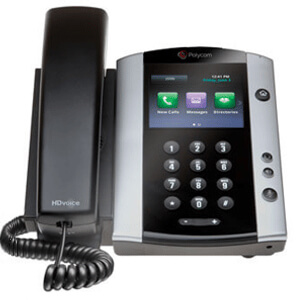
Polycom VVX 500 Business Media Phone Resources | SmartChoice
- 3.5″ 320x240px in TFT Liquid Crystal Display LCD
- 12 Line Keys
- Gigabit Power over Ethernet (PoE) with upgraded Memory/Processor
- Dual port Gigabit Ethernet Switch 10/100/1000Base-TX across LAN and PC Port
- Supports Session Initiation Protocol (SIP)
Compare phones and review the Polycom VVX 500 datasheet, Polycom VVX 500 specs, and Polycom VVX 500 user guide for the Polycom VVX 500 and 501 business media phones.
Performance business media phones that deliver best-in-class desktop productivity and unified communications for busy professionals
Summary The Polycom VVX 500/501 Series are performance business media phones combining HD Voice, SIP support, and a multitouch, gesture-based interface that integrate seamlessly with a wide range of UC environments. They boost productivity with Outlook calendar and corporate directory access, PC desktop integration for simplified dialing and screen extension, and video playback. Easy to deploy and manage with broad interoperability, they are highly customizable and expandable with apps, accessories, and streamed content, and offer Gigabit PoE with dual-port Ethernet for flexible enterprise deployments.
The Polycom® VVX® 500 Series performance business media phones unify superior voice capabilities and applications into a simple-to-use, yet high-performance unified communications (UC) solution. It is the ideal, all-in-one knowledge worker productivity tool, built to integrate seamlessly into a wide range of UC environments. As an HD Voice VoIP phone, the Polycom VVX 500 helps ensure clear calls in demanding office settings.
Simplicity and ease of use
The Polycom VVX 500 Series phone is built for today’s busy managers and knowledge workers who need a powerful, expandable office phone that keeps up with their multitasking and schedule-juggling. Building on the behavior common to mobile phones, the multitouch, gesture-based user interface of the Polycom VVX 500 makes navigation intuitive and easy.
Maximize productivity
Designed for a broad range of environments from small and medium businesses to large enterprises, the Polycom VVX 500 Series performance business media phone improves productivity by complementing the workplace applications on the user’s computer. Users benefit from such capabilities as viewing their Outlook calendar on the phone and receiving meeting reminders while still having access to their corporate directory—all while waiting for their PCs to boot. Users can also extend their PC desktop to include the Polycom VVX 500 Series screen, helping to enable simplified interactions and dialing using their PC’s mouse and keyboard. Training and multipoint communication applications are complemented by the Polycom VVX 500 Series video playback capability for streaming content.
Best-in-class deployment and administration
The Polycom VVX 500 Series is easy to deploy and simple to manage. Its enterprise-grade, Web-based, intuitive configuration method gives administrators the ability to easily set up and maintain a large number of phones throughout the entire enterprise. The built-in, broad interoperability capabilities allow IT departments to leverage previous IT infrastructure investments and achieve easy integration with third-party UC and productivity applications.
Highly customizable and expandable
The Polycom VVX 500 Series provides personalized information at a glance, through builtin Web applications and even a digital photo frame. Polycom’s “My Info Portal” serves up stocks, news, sports, weather and other streamed content directly to the phone screen. The Polycom VVX 500 Series is ready for future expansion modules and accessories for applications such as videoconferencing and even wireless networking.
Market-leading open standards interoperability
Designed for enhanced interoperability, leveraging and complementing the other existing IT investments of any enterprise, the Polycom VVX 500 Series delivers HD Voice™, a superior UC experience bundled with business applications. With the broadest call server interoperability in the industry, the Polycom VVX 500 Series business media phone is a flexible foundation for any organization’s UC strategy.
Q&AQuestion: What are the standout features of the Polycom VVX 500/501 Series?
Short answer: The VVX 500/501 are performance business media phones with HD Voice, SIP support, and a multitouch, gesture-based interface. They offer a 3.5″ 320×240 TFT LCD, 12 line keys, Gigabit Power over Ethernet (PoE), and a dual-port Gigabit Ethernet switch (LAN and PC). They integrate with a wide range of UC environments, support PC desktop integration, Outlook calendar access, corporate directory lookup, and video playback, and are easy to deploy and manage with broad interoperability.
Question: How do these phones help boost user productivity?
Short answer: They complement desktop workflows by displaying Outlook calendars and meeting reminders, providing corporate directory access, and allowing users to extend their PC desktop to the phone’s screen for simplified interactions and dialing using a PC mouse and keyboard. Video playback supports training and multipoint communication, and many functions are available even before a PC has finished booting.
Question: Are the VVX 500/501 easy to deploy and manage in an enterprise?
Short answer: Yes. They feature an enterprise-grade, web-based, intuitive configuration method for streamlined setup and maintenance across many devices. Their broad interoperability lets IT teams leverage existing infrastructure and integrate with third-party UC and productivity applications, supporting flexible, large-scale deployments.
Question: Can the phones be customized or expanded?
Short answer: Yes. They support personalization via built-in web apps and a digital photo frame, plus Polycom’s My Info Portal, which streams stocks, news, sports, weather, and other content to the screen. They are also ready for expansion modules and accessories, including options for videoconferencing and wireless networking.
Question: What connectivity and standards do they support?
Short answer: The VVX 500/501 support Session Initiation Protocol (SIP), deliver Polycom HD Voice, and include Gigabit PoE with a dual-port Gigabit Ethernet switch for LAN and PC connectivity. With 12 line keys and market-leading open-standards interoperability, they fit seamlessly into diverse UC environments and call server platforms.
Top 5 Benefits of Choosing an Enterprise-Level Managed Services Provider for Telecom Solutions
In today’s rapidly evolving digital landscape, businesses are continuously seeking ways to enhance their operational efficiency and reduce costs. One way they achieve this is by partnering with Enterprise-Level Managed Services Providers (MSPs) for telecom solutions. These providers deliver comprehensive services that not only streamline communications but also add significant value through various benefits. This article delves into the top five benefits of choosing an enterprise-level MSP for telecom solutions, including cost efficiency, scalability, enhanced security, improved performance, and round-the-clock support.
1. Cost Efficiency Reduced Operational CostsOne of the primary advantages of engaging an enterprise-level managed services provider is the substantial reduction in operational costs. By outsourcing telecom solutions, businesses can eliminate the need for in-house infrastructure and staff dedicated to managing telecommunications. This reduces labor costs, as enterprises are not required to hire specialized teams for maintenance and troubleshooting. Moreover, MSPs often leverage economies of scale, which allows them to negotiate better rates with telecom carriers and hardware vendors, passing on those savings to their clients.
Predictable BudgetingAnother key aspect of cost efficiency is predictable budgeting. Managed services typically operate on a subscription or fixed-fee model, which means businesses can forecast their telecom expenses with greater accuracy. This fixed pricing structure allows companies to allocate their budgets effectively without worrying about unexpected spikes in costs due to unforeseen outages or emergency repairs. As a result, organizations can focus on their core business objectives rather than being bogged down by fluctuating telecom expenses.
Elimination of Overhead ExpensesBy partnering with an MSP, companies can also eliminate the overhead costs associated with maintaining their telecommunications infrastructure. This includes expenses related to hardware upgrades, maintenance, software licensing, and utility costs related to running physical systems. With an enterprise-level MSP, these costs are typically absorbed by the provider, freeing up capital that organizations can invest in other areas of their business, such as research and development or marketing initiatives.
2. Scalability Flexible Resource AllocationScalability is a significant benefit of using managed services for telecom solutions. As businesses grow, their telecom needs often change. An enterprise-level MSP can provide the flexibility required to scale resources up or down based on current demand. Whether it’s adding new lines, services, or locations, an MSP can accommodate changes swiftly without necessitating major capital expenditures. This agility ensures that companies can respond to changes in the market effectively.
On-Demand ServicesIn addition to flexible resource allocation, many MSPs offer on-demand services that allow businesses to access additional resources as needed. For example, during peak business periods, companies may require more bandwidth or enhanced communication services. An enterprise-level MSP can provide these additional resources with minimal lead time, enabling businesses to maintain operational efficiency and customer service standards without delay. This on-demand model provides a significant advantage over traditional telecom solutions.
Adaptability to Business GrowthAs organizations expand, integrating new technologies and systems can be complex and resource-intensive. Managed services providers are equipped to handle this complexity, offering seamless integration services that allow businesses to upgrade their telecom solutions as needed. This adaptability is crucial for organizations looking to stay competitive in a fast-paced market. The ability to quickly implement new technologies ensures that businesses remain agile and responsive to market demands.
3. Enhanced Security Advanced Security ProtocolsIn an age where cyber threats are ever-increasing, security is a top priority for businesses. Enterprise-level MSPs implement advanced security protocols that protect sensitive telecommunications data from potential breaches. These providers utilize cutting-edge technologies such as encryption, firewalls, and multi-factor authentication to safeguard communications against unauthorized access. By partnering with an MSP, businesses can enhance their security posture significantly compared to managing these solutions in-house.
Regular Compliance UpdatesAnother essential aspect of security is compliance with industry regulations. MSPs are well-versed in the compliance requirements specific to the telecom industry and can ensure that businesses adhere to these laws. Regular compliance updates help mitigate the risk of legal penalties and maintain customer trust. An enterprise-level MSP remains informed about evolving regulations and can provide the necessary adjustments to policies and procedures, reducing the burden on internal teams.
Proactive Threat ManagementFurthermore, enterprise-level MSPs employ proactive threat management strategies to detect and respond to security incidents before they escalate. Through continuous monitoring of networks and systems, MSPs can identify unusual activities or potential vulnerabilities, allowing them to respond swiftly. This proactive approach to security not only protects sensitive information but also instills confidence in customers and stakeholders regarding the integrity of the organization’s operations.
4. Improved Performance Optimized Network EfficiencyPerformance improvement is another significant advantage of utilizing managed services for telecom solutions. MSPs are skilled in optimizing network performance by diagnosing and addressing inefficiencies in communication systems. By conducting regular assessments and employing performance monitoring tools, these providers can identify bottlenecks and implement solutions to enhance overall network efficiency. This results in smoother communication and improved collaboration within the organization.
Reduced DowntimeDowntime can be a costly issue for businesses, leading to lost productivity and revenue. Managed services providers minimize downtime through reliable maintenance and support services. By employing preventive measures, such as regular updates and system checks, MSPs can address potential issues before they result in outages. Additionally, in the event of an unforeseen downtime incident, an enterprise-level MSP has the resources and expertise to restore services quickly, ensuring minimal disruption to business operations.
Access to Cutting-Edge TechnologyMoreover, partnering with an enterprise-level MSP grants businesses access to cutting-edge technology that may otherwise be financially unfeasible. MSPs continuously upgrade their offerings to include the latest communication tools and platforms that enhance productivity and collaboration. By utilizing these advanced technologies, organizations can stay competitive, improve operational efficiency, and better meet customer needs.
5. 24/7 Support Round-the-Clock MonitoringIn today’s global marketplace, businesses often operate beyond traditional working hours. As such, having access to 24/7 support is crucial. An enterprise-level MSP provides round-the-clock monitoring of communication systems, ensuring that any issues are identified and resolved promptly, regardless of the time of day. This continuous oversight allows businesses to operate smoothly and maintain service availability for customers, regardless of their geographical location.
Immediate Issue ResolutionIn addition to constant monitoring, managed services providers offer immediate issue resolution for any telecom problems that may arise. With dedicated support teams available at all hours, businesses can receive timely assistance, which minimizes downtime and operational impact. This immediate access to expertise is invaluable in maintaining efficiency and ensuring that any disruptions are dealt with swiftly and effectively.
Dedicated Technical ExpertiseFurthermore, enterprise-level MSPs employ teams of dedicated technical experts who specialize in telecom solutions. This depth of knowledge and experience is often lacking in in-house teams, especially in smaller organizations. By leveraging the expertise of an MSP, businesses gain access to a wealth of resources and insights that can enhance their telecom strategies and overall operational success.
ConclusionChoosing an enterprise-level managed services provider for telecom solutions offers numerous benefits that can significantly enhance a business’s operational capabilities. From cost efficiency and scalability to enhanced security, improved performance, and 24/7 support, the advantages are clear. By outsourcing telecom needs to a dedicated provider, businesses can focus on their core objectives while enjoying the peace of mind that comes with expert management of their communication systems. As organizations continue to navigate the complexities of the digital landscape, partnering with an enterprise-level MSP could prove to be a pivotal decision in achieving long-term success.
Frequently Asked Questions (FAQs) What is an enterprise-level managed services provider (MSP)?An enterprise-level managed services provider (MSP) is a company that provides a comprehensive range of IT and telecom services to businesses, allowing them to outsource the management and maintenance of their communication systems. This includes services such as network management, security, support, and technology upgrades.
How can partnering with an MSP reduce costs?Partnering with an MSP can reduce costs by eliminating the need for in-house infrastructure and specialized staff, providing predictable budgeting through fixed pricing models, and absorbing expenses related to hardware and software maintenance.
What are the security benefits of using an MSP for telecom solutions?MSPs enhance security through advanced protocols, regular compliance updates to meet regulations, and proactive threat management strategies that help protect sensitive data from potential breaches.
How does scalability work with an enterprise-level MSP?An enterprise-level MSP provides flexible resource allocation, allowing businesses to scale their telecom services up or down as needed based on demand. This enables organizations to respond quickly to growth or changes in the market.
What type of support can businesses expect from an MSP?Businesses can expect 24/7 support from an MSP, which includes round-the-clock monitoring of communication systems, immediate issue resolution, and access to a dedicated team of technical experts who specialize in telecom solutions.
Understanding Managed Connectivity: Common questions answered
When managed connectivity is done well, collaboration platforms like Microsoft Teams become a major force multiplier: meetings start on time, voice and video stay clear, and distributed teams can work as if theyre on the same floor.
Managed connectivity is the operational approach to making that experience consistent. Instead of treating connectivity solutions as a set of one-off circuits, a managed services provider takes responsibility for ongoing network management, performance targets, incident response, and reportingso real-time collaboration performs reliably across sites and users.
Teams is a highly visible workload, but its not the only one that matters. The same foundation that improves Teams can also improve broader enterprise traffic: Microsoft 365, contact centers, VDI, CRM/ERP, and other critical SaaS applications.
Here are the managed connectivity FAQs enterprise technology teams ask most often, with Teams as a common (but not exclusive) example.
What Exactly Is Managed Connectivity in an Enterprise Context?Managed connectivity is a service model that combines network access, managed CPE, and day-to-day operations (monitoring, change control, troubleshooting, and reporting). The goal is consistency: standardized connectivity solutions across all locations, with defined performance expectations and a clear escalation path.
Compared to a basic ISP contract, managed services typically add:
- End-to-end ownership: One accountable party for performance and uptime, not just the last-mile circuit.
- Operations layer: 24/7 monitoring, incident management, and proactive maintenance.
- Performance reporting: Visibility into latency, jitter, packet loss, and site-to-cloud behavior.
- Standardization: Repeatable designs for branch, campus, and remote access scenarios.
Teams concentrates what the business cares about mostvoice, video, screen sharing, and chatinto one user experience. When connectivity is stable and well-managed, Teams can support:
- More reliable meetings and better cross-site meeting equity
- Higher adoption of video, calling, and shared workstreams
- Cleaner integrations with Microsoft 365 (files, calendars, approvals) because the experience is consistent
- Greater confidence in Teams Phone and contact-center integrations (where used)
Managed connectivity helps by keeping performance predictable, standardizing configurations, and providing a clear operational path for incidents and changeswhich reduces day-to-day firefighting.
Is Teams the Main Reason to Invest in Managed Connectivity?For many organizations, Teams is the most noticeable application because its real-time and highly visible. But managed connectivity decisions should be anchored to a broader goal: dependable, secure performance for the enterprise application portfolio.
A good program improves Teams while also strengthening:
- SaaS performance and reliability across regions
- Cloud access patterns and egress strategy
- Security controls that dont create unnecessary latency
- Operational efficiency across multiple carriers, ISPs, and site types
For voice and video, user experience is typically governed by latency, jitter, and packet loss more than raw bandwidth. Youll want reporting that maps directly to what users feel.
From a practical network management standpoint, ask your managed services team to define and report on:
- Latency (one-way where possible): Especially site-to-Microsoft edge and between major regions
- Jitter: Variability that can degrade audio and video smoothness
- Packet loss: Even small percentages can impact call quality
- Path stability: Route flaps and asymmetric routing that can disrupt media optimization
Bandwidth still matters, but its usually a capacity-planning conversation: ensuring busy sites can support concurrency (multiple meetings/calls) without creating queueing and congestion.
Do We Need QoS for Teams? What Does Good Look Like End-to-End?QoS is most valuable when links contend. Its about protecting real-time traffic during congestion so voice and video stay smooth without starving critical business applications.
In an enterprise environment, good typically means:
- Consistent marking: Aligning Teams media markings with your LAN/WAN policy
- Queue design: Prioritizing real-time traffic while preserving overall application performance
- Verification: Ongoing testing to confirm markings are preserved across devices and tunnels
Managed connectivity can help by standardizing policy templates across sites and enforcing configuration consistency during moves/adds/changes.
Should Teams Traffic Go Through the Data Center, the VPN, or Direct to the Internet?Many enterprises get better outcomes when collaboration media avoids unnecessary hairpinning. If traffic is forced through a distant data center (or a full-tunnel VPN), you may introduce avoidable latency and create choke points.
Common approaches include:
- Local internet breakout at branches: Shorter path to Microsoft edge, reduced backhaul congestion
- SD-WAN policy-based routing: Steering Teams traffic over preferred paths and deterministic failover
- SASE with Microsoft-optimized routing: If you rely on cloud security, ensure the design avoids inefficient tromboning
If your environment uses private connectivity to cloud (for example, dedicated cloud on-ramps), be explicit: some collaboration traffic is designed for internet-based optimization and may not benefit from private routing unless engineered carefully.
How Do We Monitor and Troubleshoot Teams Qualityand Still Support the Rest of the App Stack?The fastest enterprise troubleshooting comes from correlating application experience with network telemetryso you can resolve issues quickly without finger-pointing.
Ask whether the managed services provider can support:
- QoE correlation: Mapping call quality signals to site circuit health and routing events
- Synthetic testing: Regular probes from sites to key SaaS endpoints to detect degradation early
- Clear escalation: A defined path when the issue is ISP-related vs. LAN/Wi-Fi vs. security policy
- Actionable reporting: Not just link up/down, but performance trends and root-cause narratives
The same instrumentation benefits the broader portfolio by highlighting where routing, security, or congestion impacts other business-critical applications.
How Do Security Controls Impact Teams Performance?Security can influence collaboration performance when designs add latency or disrupt optimization. The best outcomes come from designing security and performance togetherso you can keep users protected without compromising real-time experience.
In managed connectivity programs, that often means:
- Policy clarity: Defined treatment for collaboration traffic (categorization, allowlists where appropriate, and inspection posture)
- Segmentation: Keeping traffic appropriately segmented without forcing it through slow paths
- Zero Trust alignment: Ensuring identity-based controls dont unintentionally degrade media flows
High availability for collaboration typically comes from straightforward design patterns:
- Diverse access: Dual providers or diverse last-mile paths for critical sites
- Deterministic failover: SD-WAN or routing policies that fail over quickly and predictably
- Capacity planning: Ensuring backup paths can support meetings and calling during an outage
If Teams is used for telephony, also consider survivability requirements and how your managed services partner supports those scenarios operationally.
Choosing a Managed Connectivity Provider: An Enterprise Checklist (Teams-Inclusive)When you evaluate managed connectivity providers, validate that they can support collaboration workloads end-to-endand also strengthen overall enterprise connectivity.
- Teams-aware performance reporting: Latency/jitter/loss with meaningful thresholds and trends
- Proven SaaS routing design: Local breakout, SD-WAN policies, and Microsoft-optimized paths where applicable
- Operational maturity: 24/7 NOC, clear escalation, and tight incident communications
- Security compatibility: SASE/proxy/inspection designs that preserve real-time performance
- Standardization at scale: Repeatable templates for branches, HQ, and remote connectivity
With the right managed services model, managed connectivity becomes a practical foundation that helps Teams shinewhile also improving reliability and experience across the enterprise application landscape.
Global Relay’s role in teams collaboration
We have all sent a quick message using Microsoft Teams collaboration tools to approve a deal. However, according to the Securities and Exchange Commission (SEC), that casual chat is legally equivalent to a signed contract. Financial services firms face a dangerous compliance gap when staff use fast-paced apps without permanently preserving these conversations.
How do you prove what happened if a regulator investigates a three-year-old trade? Industry rules dictate that companies maintain important audit trails—a digital paper trail showing exactly who said what. To guarantee regulatory compliance, businesses use Global Relay as a digital safety deposit box. It silently locks away every message in a secure vault, letting you work with total peace of mind.
The High Cost of the Delete Button: Why Financial Firms Need More Than Standard Microsoft Teams FeaturesIt is common practice to type a quick message and immediately click “Edit” to fix a typo or “Delete” to retract a mistake. While standard Microsoft Teams features offer convenient flexibility, they create massive liability risks for financial firms. The Financial Industry Regulatory Authority (FINRA) views the ability to easily alter or erase conversations as a direct threat to legal transparency.
To prevent missing evidence, the Securities and Exchange Commission enforces SEC Rule 17a-4. This mandate requires business communications to be kept in “immutable storage”—meaning once a message is sent, a copy is permanently locked away where it cannot be changed or erased by anyone. This strict standard separates a simple, easily overwritten daily IT backup from a legally defensible regulatory archive.
Relying solely on out-of-the-box settings falls short of the rigorous demands for FINRA compliant Microsoft Teams recordkeeping. Financial firms need a way to let employees chat naturally while automatically securing the unalterable evidence in a protected vault. This seamless protection sets the stage for automatic, comprehensive data capture.
The Silent Observer: How Global Relay Integration Automatically Captures Every WordImagine if your company could use Teams for everything without ever worrying about a surprise regulatory audit. The secret is the Global Relay connector for Microsoft 365. Think of it as a silent observer sitting quietly in the background of your digital office. Instead of asking employees to manually save their conversations, this tool creates a frictionless experience known as zero-effort compliance.
Whenever someone hits send, Global Relay integration with Microsoft Teams goes to work instantly. It automatically drops a duplicate copy of the interaction into a locked vault before anyone has the chance to alter it. This automated data capture secures far more than just standard text. The system silently archives a complete picture of your daily business, capturing:
- One-on-one chats
- Group channels
- File shares
- Emojis
Because this process happens entirely behind the scenes, staff can collaborate naturally without changing their daily routines. Even if a user deletes a sensitive message in the chat window, the original remains untouched in the archive. Securing this indestructible copy is just the beginning. The real value comes when you must present this evidence, moving from simple storage to proof for the regulator.
Proof for the Regulator: Building Bulletproof Audit Trails with Immutable MetadataSaving a chat is only half the battle; finding it years later during an audit is the real challenge. When regulators like the SEC request files, they expect more than just message text. They require the “digital fingerprint” of the conversation, known as metadata. By extracting metadata for compliance audit trails, systems capture hidden details—like exactly who sent a message, when, and from what device.
Regulators expect rapid answers, and indexed search makes finding one specific conversation among millions instantaneous. This process—often called eDiscovery—organizes your cloud-based archiving system so compliance officers can retrieve exact conversations in seconds. Following Microsoft Teams eDiscovery best practices, an audit-ready trail requires three core components:
- Timestamps showing exact send moments
- Participant IDs verifying everyone involved
- Original content versus edited content
Without these unchangeable details, a saved record is just text anyone could have typed. Metadata proves a message’s absolute authenticity during an inquiry. Yet, reacting to past conversations is only the baseline for financial firms. Proactive real-time monitoring takes this protection further, actively preventing insider trading risks before they materialize.
Beyond Recordkeeping: Using Real-Time Monitoring to Prevent Insider Trading RisksArchiving messages in a digital vault is a fantastic defense, but protecting a financial firm requires playing offense. Rather than just storing conversations for later, modern compliance tools use real-time surveillance to actively watch the digital office. This stops policy violations before they escalate into million-dollar fines.
Running continuously in the background, the system constantly monitors Microsoft Teams for insider trading prevention. If someone types a suspicious phrase—like “guaranteed return” or “don’t tell anyone”—the software immediately flags the keyword. This automated alert notifies managers instantly, fulfilling the proactive supervision requirements of FINRA Rule 3110 without requiring humans to read every chat.
Catching these risky conversations instantly protects the company from a single rogue employee’s bad judgment. By combining unbreakable storage with immediate alerts, your firm secures its daily communication against both internal and external risks.
From Risk to Resilience: A 3-Step Action Plan for Compliant CollaborationYou no longer have to choose between modern collaboration and regulatory safety. By treating Global Relay as an automatic safety deposit box, you achieve zero-effort compliance while maintaining frictionless work. To actively mitigate compliance risks today, start with this simple roadmap:
- Audit your current Teams retention settings.
- Implement a dedicated connector for unified communication archiving.
- Train your staff on exactly why these rules exist.
Proper regulatory capture for financial services ensures your firm can communicate instantly without fearing a surprise investigation. Your chat is your record—protect it accordingly, and confidently lead your business with constant audit-readiness.
Get familiar with SmartChoice products
Watch SmartChoice communication and collaboration solutions videos to learn how our tools can transform your business productivity and connectivity.
Become a partner
Extend your offering with enterprise-grade voice and connectivity solutions, backed by our 24/7/365 support—based in the U.S.



Connect with us
Book a discovery call to discuss how we can help you consolidate, standardize, and scale your enterprise communication infrastructure.