Proven strategies. Real results.
Trusted expertise.
Explore our case studies and insights to learn how our unified, cloud-based solutions and signature service model deliver performance, compliance, and lasting impact across industries.
Best practices for installing security cameras in Florida schools: A comprehensive guide using Verkada & SmartChoice
The brief:
School safety remains a top priority in Florida, especially as policymakers continue reinforcing requirements for classroom and campus video monitoring. As districts modernize, selecting a unified, compliant, and scalable camera system becomes crucial.
This guide outlines best practices for deploying security cameras in Florida K–12 schools—leveraging Verkada’s education‑focused security solutions and SmartChoice’s managed connectivity, surveillance integration, and district‑wide deployment support.
Verkada wall-mounted security camera Verkada panic button1. Understand Florida’s requirements — especially for special education classrooms
Florida law permits cameras in many K–12 settings and, in some cases, requires them. The state mandates that:
- A camera must be installed in a self‑contained special education classroom when a parent submits a written request.
- These classrooms are defined as spaces where a majority of students receive special education services for at least 50% of the school day.
- Schools must install and activate the camera within 30 days of receiving the request.
- The camera must capture the entire classroom, including connected instructional areas.
Other legislation such as HB 257 requires:
- Video and audio monitoring in designated classroom environments
- A minimum 3‑month retention window for recordings
- Strict rules governing who may access, request, and review footage
Before designing a campus‑wide camera plan, districts should review:
- Whether a space is considered a classroom vs. common area
- Audio‑recording rules (Florida is an all‑party consent state)
- FERPA requirements for storing, accessing, and redacting footage
2. Prioritize privacy-conscious, AI‑enabled technology
Verkada—delivered and supported by SmartChoice—provides districts with tools that simplify compliance and protect student privacy:
- AI‑powered search for quickly locating individuals, vehicles, or incidents
- Face Blur tools that automatically obscure student identities when sharing or reviewing footage with parents, external agencies, or the public
- Configurable privacy regions, ensuring sensitive areas remain blocked
- On‑device storage up to 365 days, eliminating NVR/DVR vulnerabilities
- Cloud‑based access, enabling district leaders to review footage from any school
Verkada’s unified platform also integrates cameras, access control, sensors, alarms, and emergency tools within one dashboard—ideal for large or multi‑site districts.
3. Follow strategic camera placement guidelines — and know where not to place them
Effective school security plans focus on coverage of:
- All primary entry/exit points
- Hallways, stairwells, and high‑traffic corridors
- Parking lots, athletic areas, and bus loops
- Cafeterias, gymnasiums, auditoriums
- Server rooms, IT closets, and other sensitive administrative spaces
Equally important is knowing where cameras cannot be placed. Schools should never install cameras in:
- Restrooms
- Locker rooms
- Changing areas
- Nurse’s offices (if used for medical privacy)
Verkada’s centralized dashboard makes it easy to manage compliant camera placement across campuses.
4. Establish reliable connectivity & infrastructure
Cloud‑managed systems depend on strong network performance. SmartChoice ensures:
- Enterprise‑grade internet with proactive monitoring
- Managed WiFi, optimized for always‑connected camera environments
- SD‑WAN for resilient traffic routing between campuses
- One‑provider support for telecom, security, and infrastructure
- Proactive network monitoring and alerts for all endpoints – including cameras – with SmartChoice’s Smart Tile product
Consistent connectivity is essential—especially because outages in required classrooms must be documented and preserved for one year.
5. Implement strong access controls, permissions & governance protocols
Florida law mandates restricted access to footage, identity protection, and strict retention rules. Verkada simplifies governance with:
- Role‑based permissions
- IT teams: full system oversight
- Administrators/SROs: live + historical access
- Teachers: limited access (e.g., classroom views or only live feeds)
- Comprehensive audit logs that track every access event
- Cloud archiving for long‑term or legal hold storage
- Face Blur for FERPA‑aligned sharing
Districts should define:
- Who can access footage?
- Who can export/share footage with parents or authorities?
- Who can initiate emergency response tools such as lockdowns?
Schools should also train staff on:
- How to locate, save, and securely share footage
- How to create proactive alerts
- How to access emergency tools during critical situations
6. Build a comprehensive emergency response workflow
This is one of the most valuable capabilities for Florida schools.
Verkada’s emergency response ecosystem enables:
Instant, controlled sharing with law enforcement
- Share live video feeds with police or district security teams
- Share historical footage during investigations
- Add Face Blur automatically when sharing footage involving students
Real‑time campus visibility
- Live floorplans showing camera locations and active events
- Immediate situational awareness for administrators and responders
Lockdown capabilities
- Initiate campus‑wide or zone‑based lockdowns from mobile, desktop, or integrated panic buttons
- Automated door‑locking sequences if integrated with access control
Teacher & administrator panic buttons
- Desktop, wearable, or wall‑mounted panic devices
- Instant alerts to administrators, SROs, and first responders
Reliable connectivity during emergencies
Paired with SmartChoice’s redundant networking and monitoring, districts gain uninterrupted visibility during crises—when seconds matter most.
7. Choose a deployment model that scales across the district
For multi‑site deployments:
- Verkada offers plug‑and‑play PoE cameras that come online within minutes
- SmartChoice delivers white‑glove installation, standardized cabling, and nationwide support
This ensures consistency and quality across new buildings, aging campuses, or rapidly expanding districts.
Bonus: The latest best practices in school security technology
For districts exploring advanced capabilities, modern camera platforms can include:
- NCIC/real‑time crime center integrations for law enforcement collaboration
- Person of interest notifications using AI‑powered identity matching
- Fight detection alerts that automatically notify administrators or SROs
- Live bus‑camera streaming, even while buses are in motion
- Environmental sensors for vape, smoke, air quality, or noise anomalies
- Automated intrusion detection tied to alarms and dispatch workflows
These tools help districts move from reactive to proactive safety management.
Conclusion
Florida districts face rising expectations around school safety, compliance, and emergency responsiveness.
By combining:
- Verkada’s modern, AI‑powered, privacy‑conscious security platform, and
- SmartChoice’s unified connectivity, managed WiFi, and end‑to‑end deployment support,
schools can build a safer, more compliant, and more future‑ready security ecosystem that meets Florida’s evolving requirements.

Architecting mission-critical connectivity for HIPAA-regulated environments
The brief:
In healthcare, connectivity is a clinical requirement. As EHR (electronic health records) and high-resolution imaging migrate to the cloud, the underlying transport layer must be engineered for zero-fail redundancy and strict regulatory alignment.
Deterministic performanceWe provide a managed connectivity framework designed to handle the bursty nature of medical data transfers (DICOM imaging, real-time telemetry) while maintaining the low latency required for high-fidelity telehealth sessions.
Infrastructure as a managed service (IMS)We abstract the complexity of managing multi-carrier environments. By providing a single pane of glass for connectivity, healthcare providers can ensure that “always-on” clinical systems remain performant across hospitals, labs, and satellite clinics.
Security & compliance integrityOur architecture is built with a “security-first” posture. By implementing encrypted data paths and continuous endpoint monitoring, we provide the technical controls necessary to support HIPAA compliance and protect PHI (Protected Health Information) across the entire WAN.
ScalabilityAs healthcare organizations scale through M&A or clinical expansion, we provides a repeatable, hardened network template that ensures rapid integration without compromising the existing security or performance baseline.
Mitigating architectural complexity in network monitoring tools
The brief:
For the modern distributed enterprise, the network is no longer a perimeter—it’s a fragmented ecosystem of disparate ISPs, hardware stacks, and edge densities. Without a centralized abstraction layer for monitoring, IT debt accrues rapidly.
Observability over “monitoring”Standard monitoring tells you if a link is up; true observability provides the telemetry needed to understand why a latent connection is degrading the application layer at a specific branch.
Mean time to repair (MTTR) reductionBy leveraging real-time heuristics and proactive alerting, engineering teams can shift from reactive “firefighting” to automated fault detection. Centralized visibility allows for remote root-cause analysis, effectively eliminating the OpEx associated with unnecessary on-site technical dispatches.
Hardening the distributed edgeEvery new location expands the attack surface. Centralized management ensures uniform firmware compliance and identifies anomalous traffic patterns indicative of a breach before they escalate into systemic failures.

Integrating your Global Relay SMS compliance into Microsoft Teams
We realize integrating with your existing Global Relay instance is essential for compliance and accountability.
At SmartChoice, our signature Microsoft Teams/SMS channel service makes searching for any employee SMS messages a breeze with our Teams-like line-by-line account of any conversation. No longer will you need to go those individual, automated emails of each SMS message. We display the SMS messages in the conversation as they were at the time so you can read items in proper context. This ensures full regulatory compliance with FINRA while streamlining any internal reviews.
Here’s a deeper look at why this integration is so critical:
1. Regulatory Compliance Is Non-Negotiable
- Financial firms are subject to strict regulations like SEC Rule 17a-4, FINRA, MiFID II, and GDPR, which mandate the capture, retention, and supervision of all business communications.
- Global Relay enables compliant archiving of voice, text (SMS), email, and collaboration tools (like Microsoft Teams), ensuring firms meet legal and audit requirements.
2. Surveillance and Risk Detection
- Global Relay’s AI-powered tools can monitor communications in real time, flagging potential misconduct or insider trading before it escalates.
- This proactive surveillance is only possible when telecom data is fully integrated and searchable.
3. Operational Efficiency and Legal Readiness
- Integrated systems like Global Relay and SmartChoice’s SMS Microsoft Teams channel function allow for fast search, retrieval, and legal discovery of communications during audits or investigations.
- This reduces the burden on compliance teams and minimizes legal exposure during disputes or regulatory reviews.
Elevating your physical phone system to the cloud
The “cloud” is perhaps the greatest thing to happen to the telecommunications industry since VoIP started replacing plain old telephone service (POTS).
Cloud connectivity provides a more effective and efficient way to perform business tasks over a network. Businesses can use the cloud to connect to their network, and have faster access to services including IP telephony, video conferencing and unified communications.
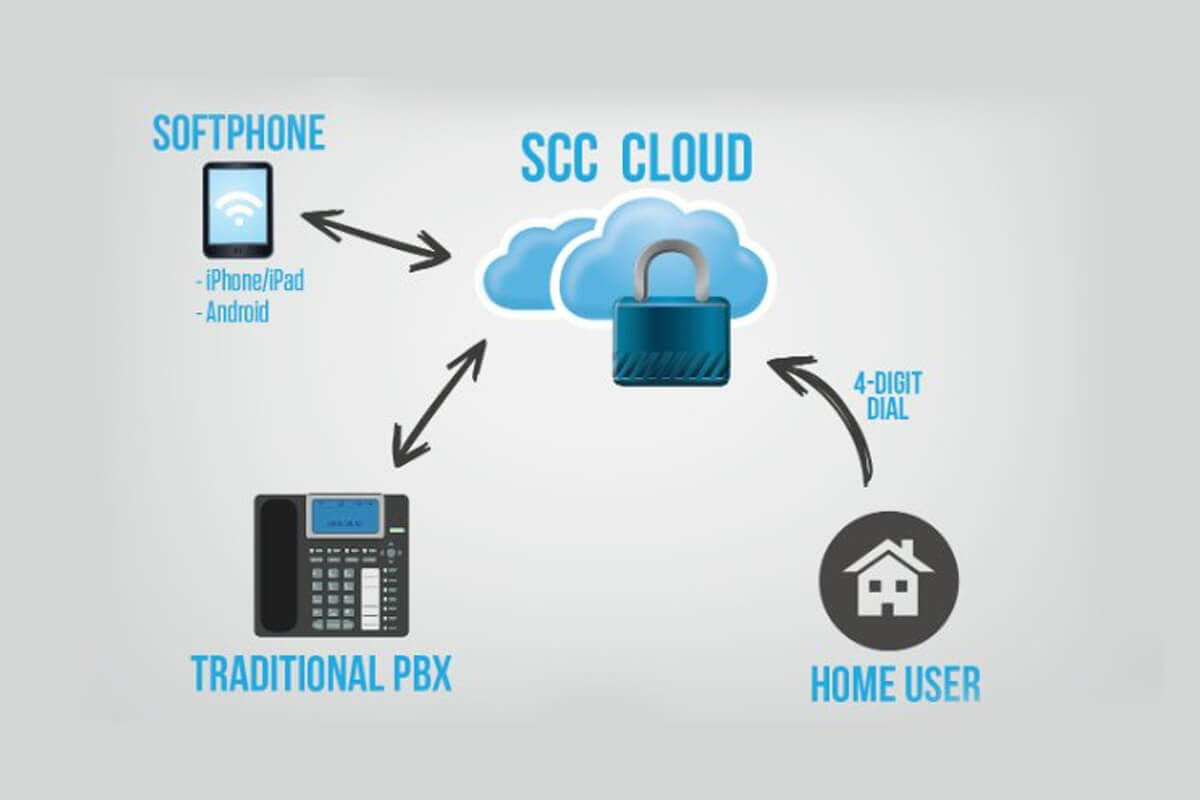
Today, telecom companies can provide cloud hosted PBX under a simple pricing structure and infrastructure design. The desk sets are plugged into a router, and all the calls and features are handled off-location by your provider via IP-PBX. Hosted PBX allows for providers to easily provide support such as patches and upgrades and gives them the ability to add new feature sets as needed. Since everything is routed through the Internet, moving a phone system is as easy as plugging your IP phone into another broadband connection, in any location. Also, in case of Internet loss during a natural disaster or catastrophe, operations will still continue because calls can be routed through other services such as softphones, email and eFax. The benefits of a cloud hosted PBX are abundant and will only continue to increase.
Still have a traditional PBX system from Avaya, Cisco or Mitel?So maybe you have an older PBX system and you’re thinking, “the cloud sounds great and all but updating all of my phone systems is just not in my budget.”
Well, that’s where SmartChoice comes in. We will integrate your traditional PBX system with our secure, state-of-the-art SmartChoice Cloud through Microsoft Teams, and give you full accessibility to all of your voice and data networks across the world. By integrating PBX to cloud, buying and/or upgrading any of your telecom system hardware is no longer necessary.
Our SmartChoice/Microsoft Teams cloud acts as a private and secure gateway to your customers and users. Remote users can dial in via 4-digit dial and will be instantly routed to the intended person. We also feature the use of softphones, which gives you all the same access to your business line and contacts, all on your smartphone or computer. Voice and data networks are securely maintained and stored in a private network, so you never have to worry about your information being accessed by other parties. Plus, our Cloud Disaster Recovery and Disaster Recovery Auto-Attendant covers you if any accidental damage to your network occur.

Ringdown through Microsoft Teams: A game changer for trading floors
Consolidation. Standardization. Scalability. Everywhere you grow.
In financial services, milliseconds matter. Whether on a trading floor, in a brokerage office, or across global markets, the ability to connect instantly with partners, exchanges, and counterparties defines competitiveness. Yet many institutions still juggle fragmented telecom systems that slow communication, create compliance risks, and strain IT resources.
That’s why ringdown telecom for financial services are mission critical. With SmartChoice’s seamless ringdown integration with Microsoft Teams, financial institutions now gain a unified, secure, and scalable way to simplify communications across every location.
This isn’t just an upgrade it’s a new standard for financial services communication solutions that keeps firms ahead of the market.
Why ringdown integration matters for financial institutions Instant, dedicated connectionsRingdowns ensure traders can connect instantly with the people who matter most: brokers, exchanges, and counterparties. No dialing, no waiting, just an immediate, reliable connection every time.
A unified experience through Microsoft TeamsThrough SmartChoice’s ringdown integration, institutions can access ringdown lines from physical desk phones or softphones directly through Microsoft Teams. It’s a consistent, unified communications platform across the entire enterprise. And with features like trader line ‘call barging’ and shared line appearances you can manage customers and compliance just as you’ve been doing for years.
Reliable and secureBuilt on SmartChoice’s enterprise-grade network with redundant connections and 24/7 monitoring, the solution delivers secure telecom solutions for banks and trading firms. It’s designed to meet the high availability demands of financial markets.
Flexible deploymentWhether deployed as part of hosted UCaaS, integrated with Teams, or configured in hybrid setups, the system adapts to each firm’s needs. This flexibility ensures financial institution network scalability as organizations grow.
Why this is a game changer for financial servicesBy combining ringdown with Microsoft Teams, SmartChoice eliminates the barriers that slow down trading communications. The result:
- Operational efficiency: One platform, one standard, across all locations
- Risk reduction: Compliance-ready monitoring and secure networks
- Scalability: Designed to grow as fast as your firm expands
- IT simplicity: Unified systems reduce management burden and vendor sprawl
In an industry where every second counts, SmartChoice positions itself as the partner that brings consolidation, standardization, and scalability—everywhere you grow.
Next stepsFinancial institutions cannot afford fragmented communications. With SmartChoice, trading floors, brokers, and banks can unify their systems into one secure, scalable solution that meets the demands of today’s markets.
- Learn more about how SmartChoice Services for Finance
- Explore our case studies
The future of financial services communication is here: instant, dedicated, compliant connections that scale with your business. SmartChoice delivers the reliability, integration, and security today’s trading environments demand.
Get familiar with SmartChoice products
Watch SmartChoice communication and collaboration solutions videos to learn how our tools can transform your business productivity and connectivity.
Become a partner
Extend your offering with enterprise-grade voice and connectivity solutions, backed by our 24/7/365 support—based in the U.S.

Connect with us
Book a discovery call to discuss how we can help you consolidate, standardize, and scale your enterprise communication infrastructure.