Firmware Management: The patching everyone forgets
“We found out we were three firmware versions behind after the breach, not before.”
Most IT teams have a routine for patching laptops and servers. Operating system updates get pushed, endpoint tools report compliance, and someone can tell you roughly where things stand.
Firmware is different. The switches, firewalls, access points and security appliances running your network each have their own firmware, released on their own vendor schedule. And on most networks, nobody’s watching it.
Why firmware is the patching everyone forgets
Firmware doesn’t show up on a daily dashboard. A switch running an outdated version works fine right up until someone exploits the vulnerability the vendor already fixed. There’s no pop-up and no reminder, and nobody gets an alert when a device falls behind.
That makes firmware invisible until it turns into an incident report. By then, the question isn’t how to patch. It’s how long the gap was open and what got through it.
The problem grows with every location you add:
- Every vendor publishes on its own schedule. Keeping up means checking multiple portals, release notes and advisory feeds.
- Every site drifts separately. A device replaced at one branch runs a different version than its twin at another.
- Every update is manual. Someone has to remember it, schedule it and do it, and that someone is usually busy with something more urgent.
The first question a cyber insurance assessor asks
Firmware isn’t just a security problem. It’s a coverage problem too.
When a cyber insurance assessor reviews your environment, patching is one of the first things they ask about, and firmware is part of that. Can you show what’s running on every network device? Can you show it’s current? Can you show how you handle vendor advisories?
If the honest answer is “we’d have to check,” that’s a hard conversation at renewal time. It’s even worse after a claim.
What good firmware management looks like
Good firmware management replaces remembering with tracking. That means:
- Knowing what’s running on every device, at every site, all the time.
- Comparing it to what the vendor has published, so you know what’s behind without having to go looking.
- Showing the advisories that matter for the devices you actually own, not every bulletin a vendor sends out.
- Scheduling updates instead of relying on someone to remember them.
That’s what SmartTile 2.0 does.
How SmartTile 2.0 handles firmware management
Every device checked against the vendor’s latest release
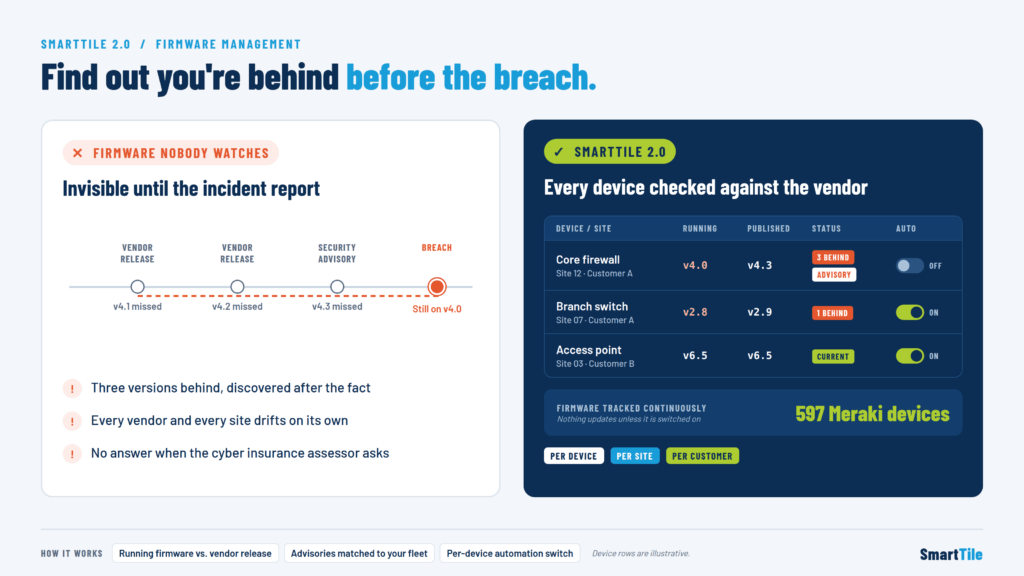
SmartTile tracks the firmware running on every device and compares it to what the vendor has published. Anything behind is flagged. You don’t have to log into vendor portals or keep a version spreadsheet up to date.
Advisories matched to your own devices
A vendor security advisory only matters if you own the affected hardware on an affected version. SmartTile matches vendor advisories against your own fleet and shows the ones that apply to you, broken down by device, by site and by customer.
For multi-location enterprises, that means seeing exactly which sites are exposed. For MSPs, it means a clear firmware picture for each client.
Updates scheduled, not remembered
SmartTile can automate firmware updates, and you turn that on device by device. When it’s on for a device, updates are scheduled instead of depending on someone’s memory.
When it’s off, nothing changes. Nothing updates unless you’ve turned it on. Your team decides which devices update automatically and which stay under manual control, whether that’s a core firewall that needs a change window or a branch access point that can update overnight.
Tracked continuously, at real scale
Firmware status in SmartTile isn’t a quarterly scan. It’s tracked continuously. SmartTile already tracks firmware on 597 Meraki devices alone, and it matches vendor advisories against each organization’s own fleet as they’re published.
So when an assessor, an auditor or your own leadership asks where firmware stands, you have the answer ready. You don’t have to go dig it up.
Who benefits most from automated firmware management
- Multi-location enterprises with the same hardware spread across dozens or hundreds of sites, each drifting on its own.
- School districts protecting student data with small IT teams and many buildings to cover.
- Healthcare, financial services and legal organizations where security questionnaires and cyber insurance requirements are strict and get checked.
- Private equity portfolio companies that need a clear security posture across newly acquired businesses.
- MSPs managing firmware across many customer environments that need per-customer visibility.
Find out before, not after
Firmware is the patching everyone forgets. It stays invisible until it shows up in an incident report, and it’s one of the first things a cyber insurance assessor asks about.
SmartTile 2.0 tracks the firmware on every device, flags what’s behind, shows the advisories that matter, and lets you schedule updates on the devices where you turn it on. You find out you’re three versions behind well before anyone else does.
Ready to see where your firmware really stands? Schedule a SmartTile demo and get a firmware view of every device, every site and every customer.