Poly VVX 600 – 601
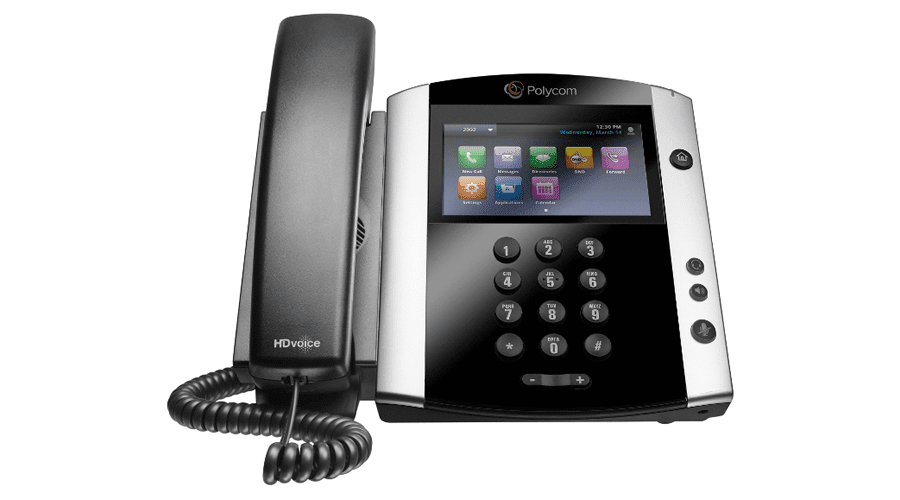

- 4.3” 480x272px in Liquid Crystal Display (LCD) resolution
- Multi-touch touchscreen
- Built-in Bluetooth
- Power over Ethernet (PoE)
- 16 Line Keys
- Upgraded Memory
- Dual port Gigabit Ethernet Switch 10/100/1000Base-TX across LAN and PC Port
- Supports Session Initiation Protocol and SDP
 Datasheet

 Compare Phones
User Guide
Compare Phones
User Guide
Polycom® VVX® 600, 601 Business Media Phones
Premium business media phones delivering best-in-class desktop productivity for busy corporate executives and managers
The Polycom® VVX® 600 Series are premium business media phones designed to enhance collaboration and personal productivity.
Simplicity and ease of use
The Polycom VVX 600 Series is built for executives and managers who need a powerful, yet intuitive, expandable office phone that helps them stay connected to lead your organization. Founded on the behavior common to smartphones and tablets, the intuitive gesture-based, multitouch user interface of the Polycom VVX 600 Series makes navigation easy and requires minimal training. With its combined ergonomic design, Polycom® HD Voice™ quality and a large, high-resolution color, multitouch screen, the Polycom VVX 600 Series business media phone is ideal.
Maximize productivity
Give your executives and managers the best unified communications (UC) experience and the industry’s highest-quality business media phone. Designed for a broad range of environments from small and medium businesses to large enterprises, the Polycom VVX 600 Series improves personal productivity by complementing the workplace applications on their computer. Users can view and manage their Microsoft Exchange Calendars, receive meeting reminders and alerts, access the corporate directory and instant messaging/presence status right on their phone display, even while waiting for their PC to boot. They can also extend their PC’s desktop to include the Polycom VVX 600 Series screen for mouse/keyboard navigation and interaction.
Best-in-class deployment and administration
The Polycom VVX 600 Series is easy to deploy and simple to manage through the Web-based, intuitive configuration tool. Its enterprise-grade Zero Touch Provisioning and server-based configuration on large-scale deployments as well as our redirection services gives your administrators the ability to easily provision and maintain a large number of phones throughout the entire enterprise. The built-in, broad interoperability capabilities allow IT departments to leverage previous IT infrastructure investments and achieve easy integration with third-party UC and productivity applications.
Highly customizable and expandable
The Polycom VVX 600 Series provides personalized information at a glance, through built-in Web applications and a digital photo frame. Polycom VVX 600 Series users access streaming content using the included video playback feature. The Polycom VVX 600 Series comes ready for future expansion modules and applications such as videoconferencing with the Polycom VVX Camera. The optional Polycom VVX Camera installs in seconds and enables the Polycom VVX 600 Series to connect into video conferences directly from the user’s desk, without requiring a costly, dedicated videoconference room.
Video tutorials
How To 3 Way Conference Call and Split Using Polycom VVX 400 & 600
How To Do Attended Transfer – When You Do Not Want Call – Using Polycom VVX 400 & 600
Sequential Ring Group Demonstration with Polycom VVX 400, 600, Cisco 79×0
Call Park Demonstration Using Polycom VVX 400 & 600
How to remove a Call Forward using the Polycom VVX 400 & VVX 600
Video Conference Call Using Polycom VVX 600 with Attached Camera
How to Split Conference Calls Using Polycom VVX 400 & 600
How to Answer Multiple Inbound Calls Using Polycom 400 & 600
How To Do 3 Way Conference Call Using Polycom VVX 400 & 600
How To Do Attended Transfer Using Polycom VVX 400 & 600
How To Retrieve Voicemail Using Polycom VVX 600
How to send calls to voicemail using Polycom VVX 400
Simultaneous Ring Group Demonstration using VVX 400, 600 & Cisco 79×0